RAG Node
The RAG Node (Retrieval-Augmented Generation) ingests documents into a Weaviate vector database and retrieves the most semantically relevant chunks to use as context for an AI Data Processing Node.

It connects exclusively to the AI Data Processing Node via a dedicated RAG port (right side of the node).
Prerequisites
- A running Weaviate instance that Agentic Signal can reach. For a an example of installation, see the Weaviate Setup guide.
- Weaviate should be configured for external embedding input, typically with
DEFAULT_VECTORIZER_MODULE=none. - If your Weaviate instance requires authentication, provide the credentials using the node's
API Key (optional)field. - A working Ollama host if you are using an Ollama embedding model in the node.
Configuration
- Embedding Model
- Collection Name
- Chunk Size
- Chunk Overlap
- Top-K Results
- Weaviate URL
- API Key (optional)
- Configuration Schema
Ollama model used to generate embeddings. Must be a dedicated embedding model (e.g. nomic-embed-text:latest). Locked to the collection's model when an existing collection is selected.
Embedding model tip: Use a dedicated embedding model like
nomic-embed-text:latestrather than a general LLM. General LLMs produce lower-quality embeddings and may have dimension mismatches.
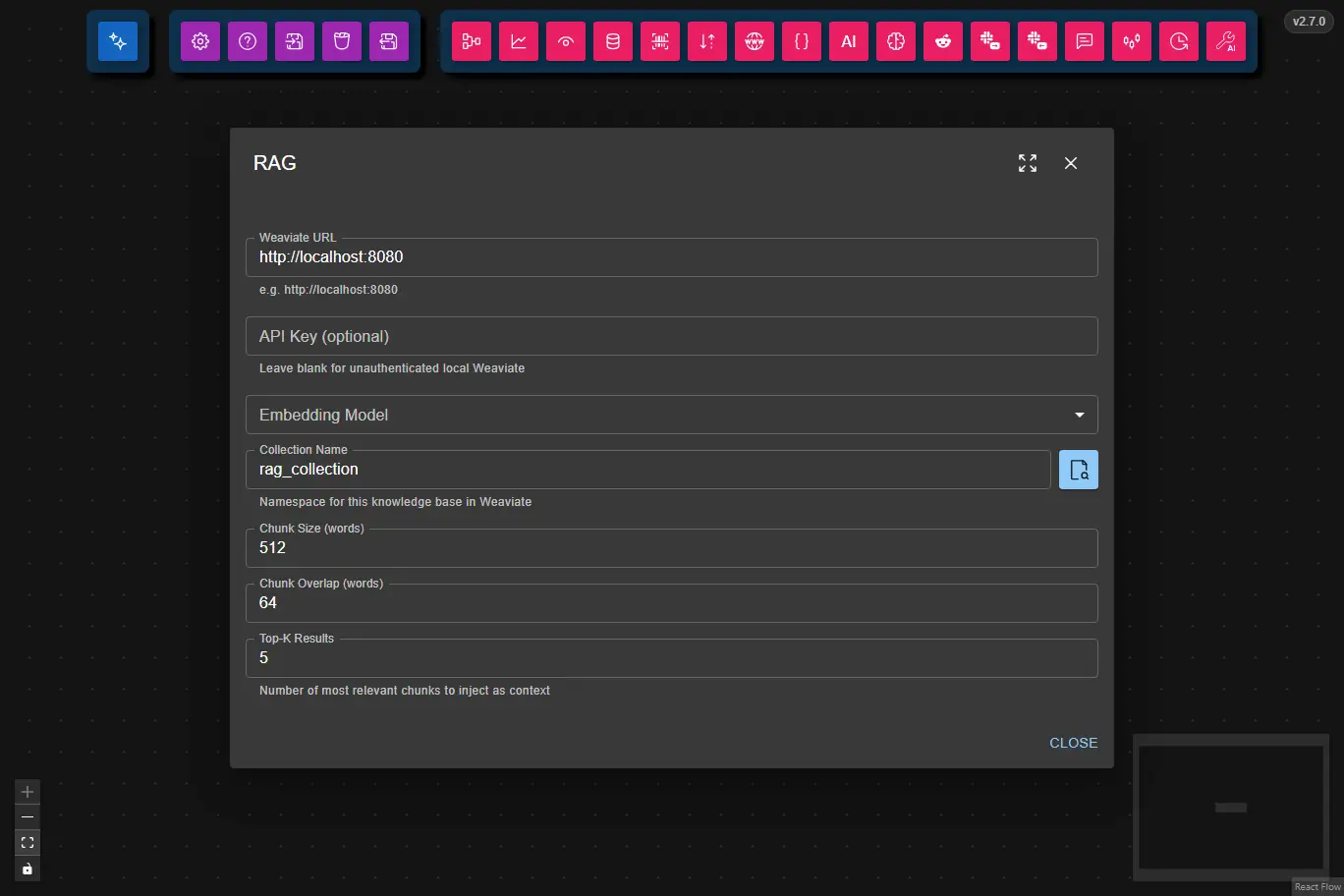
Namespace for the knowledge base in Weaviate (e.g. rag_collection). Use the browse button (🔍) to pick from existing collections.
Number of words per chunk when splitting documents.
Number of words shared between consecutive chunks (improves context continuity).
Number of most relevant chunks to inject as context.
URL of the Weaviate instance (e.g. http://localhost:8080).
Weaviate API key. Leave blank for unauthenticated local instances.
This is the full JSON Schema for the node's data configuration object, generated from the Zod schema used to validate the node at runtime.
{
  "type": "object",
  "properties": {
    "embeddingModel": {
      "type": "string",
      "description": "Ollama model name to use for generating embeddings"
    },
    "collectionName": {
      "type": "string",
      "description": "Weaviate collection name to store/query vectors"
    },
    "chunkSize": {
      "type": "integer",
      "exclusiveMinimum": 0,
      "description": "Number of tokens per text chunk when splitting documents"
    },
    "chunkOverlap": {
      "type": "integer",
      "minimum": 0,
      "description": "Number of overlapping tokens between consecutive chunks"
    },
    "topK": {
      "type": "integer",
      "exclusiveMinimum": 0,
      "description": "Number of top matching chunks to retrieve"
    },
    "weaviateUrl": {
      "type": "string",
      "description": "URL of the Weaviate vector database instance"
    },
    "weaviateApiKey": {
      "type": "string",
      "description": "API key for Weaviate (leave empty for local instances)"
    }
  },
  "required": [
    "embeddingModel",
    "collectionName",
    "chunkSize",
    "chunkOverlap",
    "topK",
    "weaviateUrl"
  ],
  "additionalProperties": false
}
Inputs
The node receives its input from the connected AI Data Processing Node. That node forwards the text it receives from a Data Source Node or any other upstream node, formatted as markdown with optional file blocks and a query:
Using the attached document, answer:

What are the main topics covered?

### File name "my-document.txt"
<file content here>
- File blocks (optional): One or more
### File name "..."sections — each is chunked, embedded, and stored in the collection. - Query (required for retrieval): The text preceding the first file block. Used to perform a vector similarity search against the stored chunks.
If no files are provided, the node performs a query-only retrieval against the existing collection — useful for interrogating a database populated by other workflows or external tools.
Outputs
The node outputs the most relevant text chunks as a formatted context string, injected into the AI Data Processing Node's prompt:
[1] (my-document.txt)
...chunk content...

[2] (my-document.txt)
...chunk content...
If no relevant chunks are found, the output is empty (null context) and the AI node proceeds without RAG context.
Ingestion Lifecycle
The node uses per-file content hashing to avoid redundant re-embedding:
| Scenario | Behavior |
|---|---|
| File is new to the collection | Embedded and inserted |
| File content unchanged | Skipped — existing vectors reused |
| File content changed | Old chunks for that file deleted, file re-embedded and re-inserted |
| File removed from workflow input | Chunks remain in DB — preserved for other workflows |
| Embedding model changed | Entire chunks class dropped and all current files re-ingested |
| Query only (no files in input) | Queries whatever is already in the collection |
This makes the node safe to use in a shared knowledge base scenario: multiple workflows can contribute documents to the same collection without overwriting each other's data.
Weaviate Schema
Each collection is stored as two Weaviate classes. The class name is derived from the collection name by stripping non-alphanumeric characters and uppercasing the first letter (e.g. rag_collection → Ragcollection).
Chunks class ({ClassName}, e.g. Ragcollection):
{
"class": "Ragcollection",
"vectorizer": "none",
"properties": [
    { "name": "content",    "dataType": ["text"] },
    { "name": "sourceFile", "dataType": ["text"] },
    { "name": "chunkIndex", "dataType": ["int"]  }
]
}
Each object also carries a vector (float array). Dimension depends on the embedding model — nomic-embed-text:latest produces 768-dimensional vectors.
Meta class ({ClassName}Meta, e.g. RagcollectionMeta):
{
"class": "RagcollectionMeta",
"vectorizer": "none",
"properties": [
    { "name": "documentHash",   "dataType": ["text"] },
    { "name": "embeddingModel", "dataType": ["text"] },
    { "name": "originalName",   "dataType": ["text"] }
]
}
Exactly one object exists in the meta class per collection. documentHash is a JSON map of { "filename": "sha256hex", ... } for per-file change detection. originalName stores the human-readable collection name (e.g. rag_collection) for display in the UI.
Minimum viable external collection (to be queryable from Agentic Signal without triggering re-ingestion):
- Create
Ragcollectionwithcontent,sourceFile,chunkIndexproperties and correctly-dimensioned vectors. - Create
RagcollectionMetawith one object:{ documentHash: "{}", embeddingModel: "nomic-embed-text:latest", originalName: "rag_collection" }.
Example Usage
See the RAG Eval workflow for an example of using the RAG node.