AI Buddy
The AI Buddy is a chat assistant built into Agentic Signal. It runs on your own Ollama models. It can build workflows for you, explain or change the one you have open, and run workflows as commands, such as /research or /weather.
Open it with the blue AI Buddy button at the left of the docks.
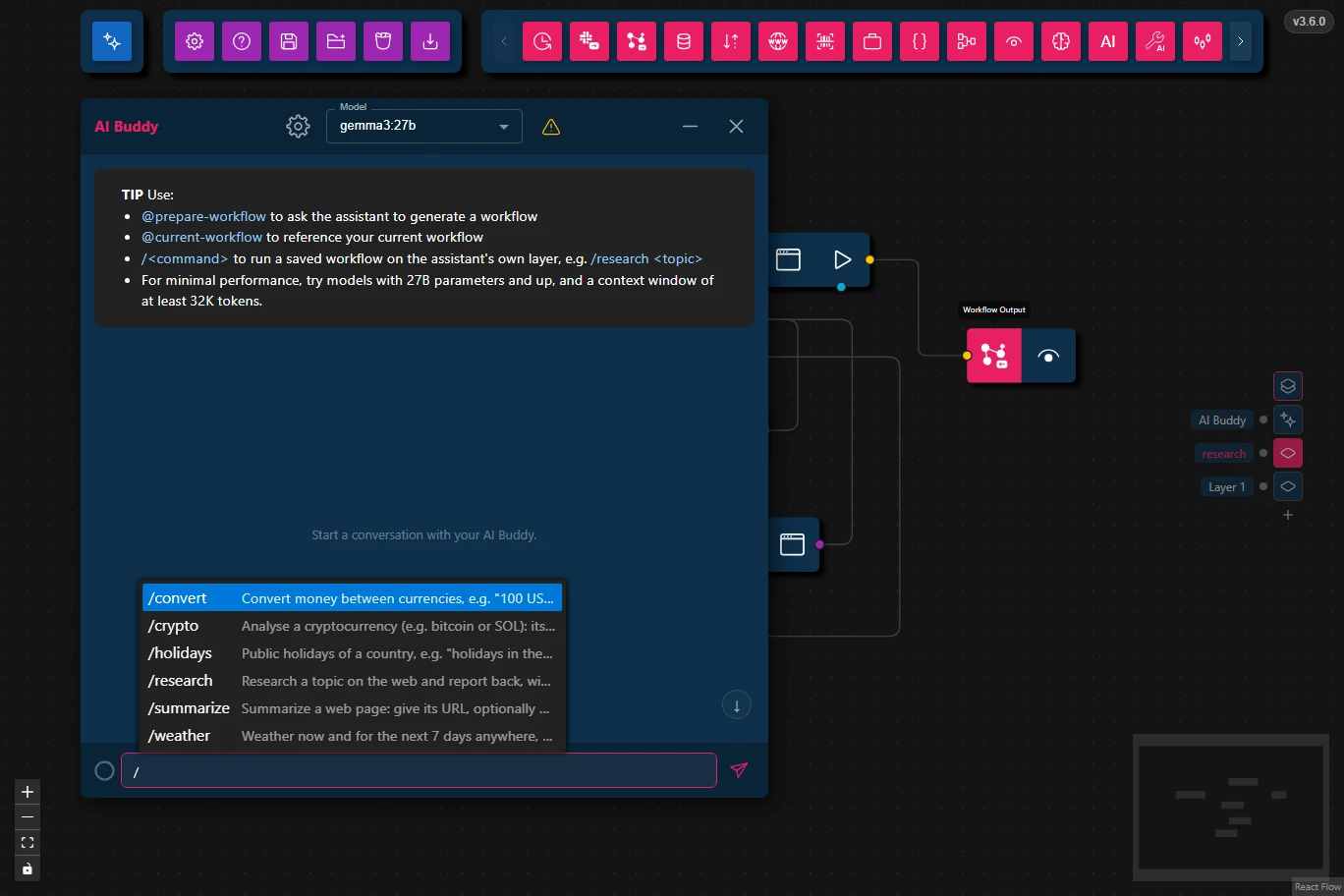
Choosing a Model
Pick a model in the chat's Model list. The AI Buddy works best with capable models: 27B parameters and up.
- The ⚠ next to the list warns when the chosen model's context window is smaller than the AI Buddy needs. The chat's tip shows the size it needs, which grows with the number of node types. It also warns when the model is an Ollama cloud model: your messages, and any workflow or files in them, are then sent to Ollama's servers instead of staying on this machine.
- The settings button next to the list sets Thinking, Temperature and the Context Window for that model.
Building and Changing Workflows
Two keywords, typed anywhere in your message, change what the AI Buddy does:
| Keyword | What it does |
|---|---|
@prepare-workflow | Asks the AI Buddy to build a workflow. Its reply holds the workflow, with a Load Workflow button under it. |
@current-workflow | Puts the workflow of the layer you're looking at into your message, so you can ask about it or ask for changes. |
For example: "@prepare-workflow fetch the weather for Paris every hour and chart the temperature", or "what does @current-workflow do?".
Load Workflow loads the prepared workflow into the layer you're looking at when you press it, with the usual load choices. Typing @ or / in the message box lists the keywords and commands to pick from.
Commands
A command is a workflow the AI Buddy can run for you. Type / followed by its name and your input:
/weather will it rain in New York tomorrow?
/summarize https://agentic-signal.com
The AI Buddy runs the command's workflow on its own AI Buddy layer. Then it answers from the result. Its reply holds:
- the workflow's result, folded away, which you can open to see exactly what the workflow returned;
- its thinking, if the model thinks;
- its answer.
If a node in the workflow fails, the reply says which one. Switch to the AI Buddy layer and open that node's logs to see why.
Built-in Commands
These come with Agentic Signal and need no API keys:
| Command | What it does |
|---|---|
/research | Research a topic on the web and report back, with sources. |
/summarize | Summarize a web page: give its URL, optionally with a question about it. |
/weather | Weather now and for the next 7 days anywhere, e.g. "will it rain in New York tomorrow?". Data: Open-Meteo. |
/crypto | Analyse a cryptocurrency (e.g. bitcoin or SOL): its last 100 days on Coinbase plus the news, ending in BUY / SELL / HOLD with a confidence. Not financial advice. |
/convert | Convert money between currencies, e.g. "100 USD to EUR", at the European Central Bank's daily reference rates. |
/holidays | Public holidays of a country, e.g. "holidays in the United States 2026". Data: Nager.Date. |
Your Own Commands
Any workflow can become a command:
- Start it with a Workflow Input Node and give the node a command name and a description.
- End it with a Workflow Output Node.
- Save it to your workflows folder.
It then appears in the / list. A saved workflow with the same command name as a built-in one replaces it. To change a built-in command, save its workflow from the AI Buddy layer and edit your copy.
The same workflows can be called by other programs too. See Calling Workflows from Outside Apps.
Suggested Commands
When one of the commands fits what you asked, the AI Buddy may end its reply by suggesting it, with Run and Skip buttons. Nothing runs until you press Run.
Message Buttons
Next to each message:
- Delete (the bin) removes that message. On a reply that is still coming in, or a command that is still running, it stops it first.
- Rewind & resend (the arrow under the bin, on your own messages) removes everything after the message and sends it again, to the model selected now. Use it to retry an answer, or to ask the same thing of another model. A command message runs its command again. The button is unavailable while a reply or command is still running.