Calling Workflows from Outside Apps
Scripts, browser extensions and other programs can run your workflows over HTTP, send them input, and get their result back. Any workflow that starts with a Workflow Input Node and ends with a Workflow Output Node can be called this way.
Setting Up
- Add a connection. Open Settings → Workflows → Outside connections. Give the connection a name, such as the app's, and optionally list the commands it may call (empty means all). Adding it copies its token. The first connection asks you to create the vault password: tokens are kept encrypted there. You can copy a token again from the list (it asks for the vault password if the vault is locked), and removing the connection stops its token from working.
- Open the workflow in a layer and press Run on its Workflow Input. Outside calls only reach workflows that are open and listening, on your own layers, never on the AI Buddy layer. Several layers may listen for the same command: each call goes to a free one, and waits in line if all are busy.
- Keep Agentic Signal open. The app runs the workflows, so calls fail while it's closed.
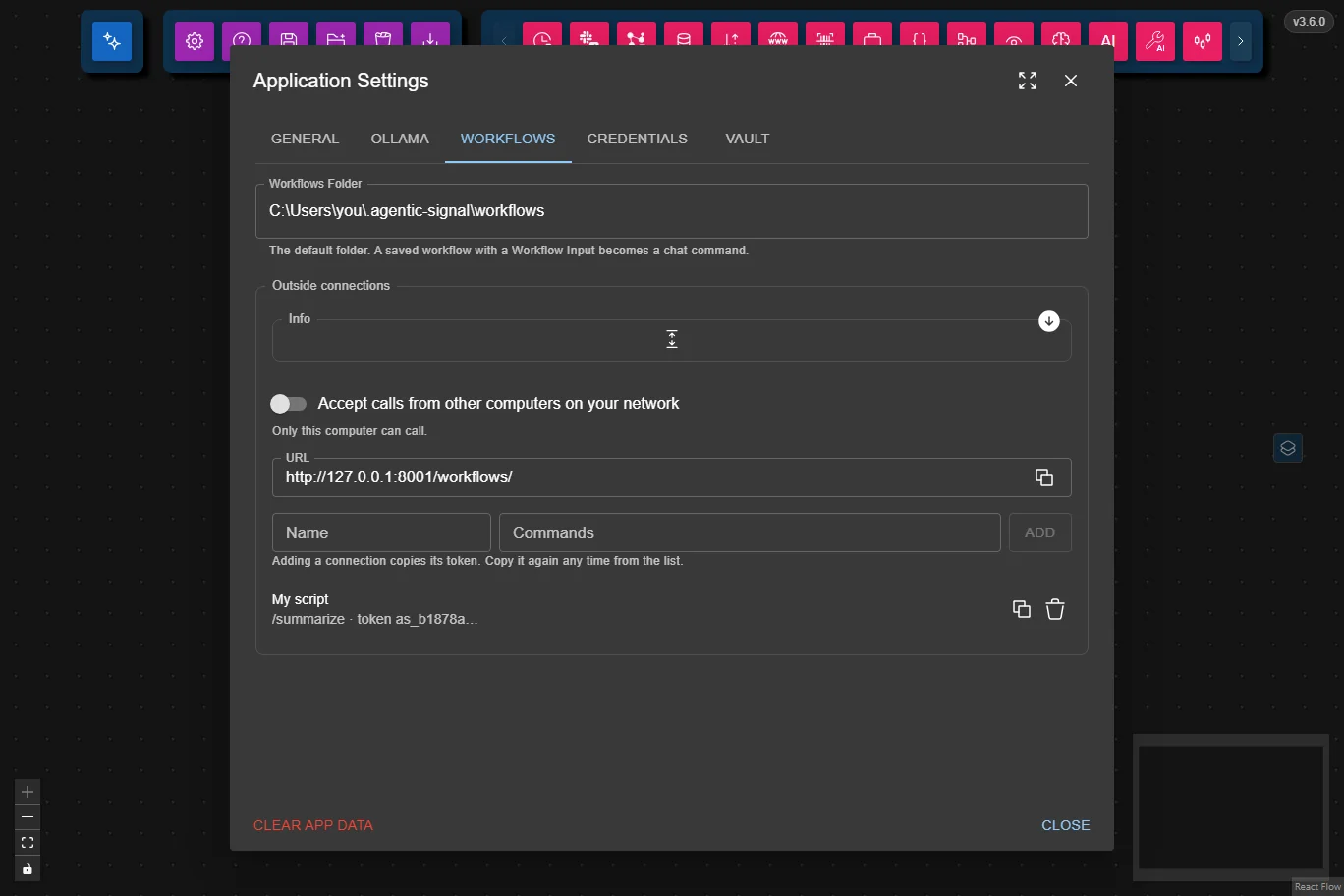
The API
Every request goes to port 8001, at the URL shown in the same Settings section (the button beside it copies it), and sends the token:
Authorization: Bearer <token>
Listing the Commands
curl http://localhost:8001/workflows -H "Authorization: Bearer <token>"
{"commands": [{"command": "summarize", "description": "Summarize a web page: give its URL, optionally with a question about it."}]}
The list holds the commands a layer listens for right now that the token may call.
Calling a Command
curl -X POST http://localhost:8001/workflows/summarize \
  -H "Authorization: Bearer <token>" \
  -H "Content-Type: application/json" \
  -d '{"type": "markdown-and-files", "value": {"text": "https://agentic-signal.com", "files": []}}'
The body has the same shape as a Data Source Node's content, and the Workflow Input emits it as a Data Source would:
- JSON:
{"type": "json", "value": <any JSON>}. Sendvalueas JSON, not as a string holding JSON. - Text and files:
{"type": "markdown-and-files", "value": {"text": "…", "files": [{"name": "report.pdf", "base64": "…", "mimeType": "application/pdf", "isToolsPayload": false}]}}.filesis required, and may be empty. A file with"isToolsPayload": truegoes to the workflow's tools only, not into the AI's input.
The answer, once the workflow is done:
{"result": {"payload": "…"}}
result is what reached the Workflow Output.
Long Runs
Some callers can't keep one request open for a whole run. A browser extension's background worker, for example, is stopped after 30 seconds. Such callers add the header Prefer: respond-async:
- The call answers at once with
202and{"job": "<id>", "status": "running"}. TheLocationheader holds the job's address. GET /workflows/jobs/<id>answers202with{"status": "running"}while the workflow runs, then what the call itself would have answered.DELETE /workflows/jobs/<id>cancels the job.
Send the same token as for the call. A job nobody checks on for 2 minutes is cancelled, and a finished job's answer is kept for 10 minutes.
Errors
A failed call answers {"error": {"code": "…", "message": "…"}}. When a node failed, error also names the node.
| Status | Code | Meaning |
|---|---|---|
400 | bad_request | The body isn't JSON, isn't sent as Content-Type: application/json, or isn't a Data Source. The message says what's wrong. |
401 | unauthorized | The token is missing or unknown. |
403 | forbidden | The connection may not call this command. |
404 | not_found | The address isn't one of those above. |
404 | unknown_command | No layer, saved workflow or built-in has this command. |
500 | node_failed | A node in the workflow failed. |
503 | no_listener | The command exists, but no layer listens for it. Press Run on its Workflow Input. |
503 | busy | Every listening layer stayed busy for too long. Try again after the Retry-After header's seconds. |
503 | app_not_open | Agentic Signal isn't open, or closed before answering. |
503 | cancelled | The run was stopped in the app. |
504 | timeout | The workflow took too long. |
Calls from Other Computers
By default only this computer can call. To accept calls from other computers on your network, turn on Accept calls from other computers on your network in the same Settings section. A URL for other computers then appears for each of this computer's network addresses, with a button to copy it. Calls travel as plain HTTP, so keep this for networks you trust.
- Docker: the container accepts calls from outside by default. Publish port
8001along with the others:docker run -p 8080:8080 -p 8000:8000 -p 8001:8001 agentic-signal. - Started with
AGENTIC_SIGNAL_COMMANDS_HOSTorAGENTIC_SIGNAL_HOST: that address decides, and the switch is locked.
Security
- Each app gets its own token. Remove a connection to cut that app off without affecting the others.
- Limit a connection to the commands its app needs.
- Tokens are kept encrypted in the vault. The app keeps only each token's fingerprint (SHA-256) in plain text, and that's all the backend ever gets, so calls keep working while the vault is locked.