Google Calendar Listing Workflow
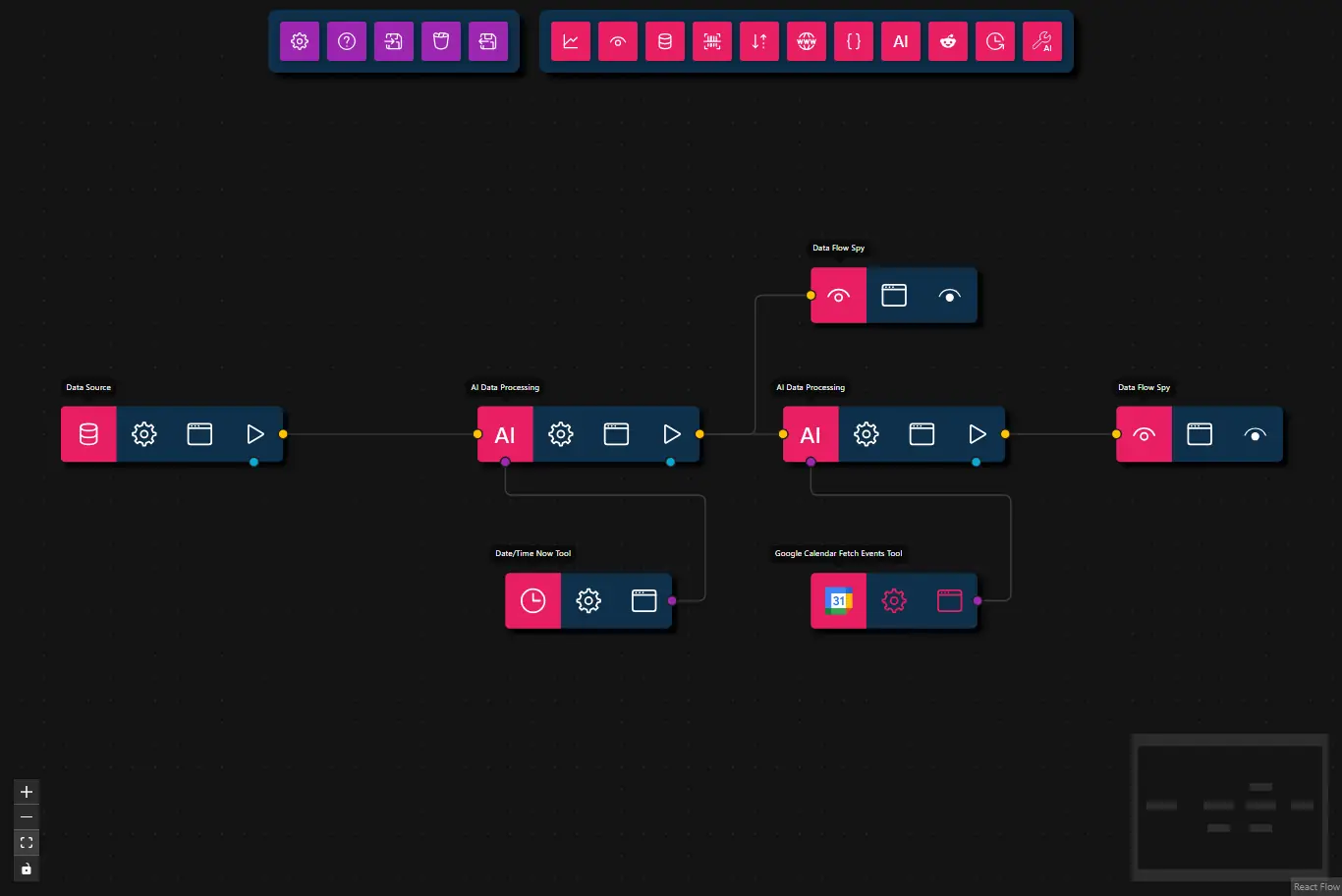
This workflow fetches a list of upcoming events from your Google Calendar using a search query and summarizes the results using AI.
Note:
This workflow uses two AI Data Processing nodes, each with a tool, because the output of the first tool (Date/Time Now) is required as input for the second tool (Google Calendar Fetch Events).
Current smaller models (≤ 27B parameters) are not able to call the available tools sequentially—they attempt to call both tools at the same time, which leads to incorrect results.
If you use a larger LLM (more than 27B parameters), you can combine both tools in a single AI Data Processing node, as larger models can more reliably call tools one after the other.
- Preview
- JSON
- Node Configuration
{
    "nodes": [
        {
            "id": "b3d137fa-6534-4fc0-a6e0-15ee919be276",
            "type": "data-source",
            "position": {
                "x": 100,
                "y": 100
            },
            "data": {
                "title": "Data Source",
                "dataSource": {
                    "value": {
                        "text": "Get me the next 3 calendar events coming up.",
                        "files": []
                    },
                    "type": "markdown-and-files"
                }
            },
            "measured": {
                "width": 160,
                "height": 40
            },
            "selected": false
        },
        {
            "id": "8a0dd721-4139-4ca4-bcc9-2624aad5b309",
            "type": "ai-tool",
            "position": {
                "x": 640,
                "y": 220
            },
            "data": {
                "title": "Google Calendar Fetch Events Tool",
                "toolSubtype": "gcalendar-fetch-events",
                "userConfig": {
                    "maxResults": 3,
                    "requireToolUse": true,
                    "googleClientId": "",
                    "browserPath": ""
                },
                "userConfigSchema": {
                    "googleClientId": {
                        "type": "string",
                        "description": "Google OAuth2 Client ID (from Google Cloud Console)"
                    },
                    "accessToken": {
                        "type": "oauth",
                        "description": "Google Calendar Authentication",
                        "provider": "calendar.readonly",
                        "scope": "https://www.googleapis.com/auth/calendar.readonly",
                        "required": true
                    },
                    "maxResults": {
                        "type": "integer",
                        "description": "Maximum number of events to fetch",
                        "default": 5,
                        "minimum": 1,
                        "maximum": 250
                    },
                    "requireToolUse": {
                        "type": "boolean",
                        "description": "Require tool use (forces the LLM to always call this tool)",
                        "default": true
                    }
                }
            },
            "measured": {
                "width": 120,
                "height": 40
            },
            "selected": false,
            "dragging": false
        },
        {
            "id": "ca0be528-34f5-48e2-8d89-3c50260998c3",
            "type": "ai-tool",
            "position": {
                "x": 420,
                "y": 220
            },
            "data": {
                "title": "Date/Time Now Tool",
                "toolSubtype": "date-time-now",
                "userConfig": {
                    "requireToolUse": true
                },
                "userConfigSchema": {
                    "requireToolUse": {
                        "type": "boolean",
                        "description": "Require tool use (forces the LLM to always call this tool)",
                        "default": true
                    }
                }
            },
            "measured": {
                "width": 120,
                "height": 40
            },
            "selected": false,
            "dragging": false
        },
        {
            "id": "7b0f7a40-769c-4406-a90b-2717db038e78",
            "type": "llm-process",
            "position": {
                "x": 400,
                "y": 100
            },
            "data": {
                "title": "AI Data Processing",
                "prompt": "Based on the next message request, you need to use dateTimeNow tool to obtain the current date time.\nYour sole responsibility is to provide more context to the original request from the date time point of view and nothing else.\nYou are to respond ONLY with the augmented request that includes the exact date and time information.\nDo NOT include any explanations, preambles, or descriptions about what you did.\nJust output the enhanced request directly.",
                "model": "",
                "maxFeedbackLoops": 0,
                "maxToolRetries": 3
            },
            "measured": {
                "width": 160,
                "height": 40
            },
            "selected": false,
            "dragging": false
        },
        {
            "id": "e94b755b-fcd8-4a87-9174-d33e44c9db7b",
            "type": "llm-process",
            "position": {
                "x": 620,
                "y": 100
            },
            "data": {
                "title": "AI Data Processing",
                "model": "",
                "prompt": "You need to use gcalendarFetchEvents tool and to output the tool result and nothing else.\nDo NOT include any explanations, preambles, or descriptions about what you did.\nThe output needs to contain the title and date of the event and nothing else.\nYou can format the outpur in markdown code.",
                "message": {},
                "format": {},
                "maxFeedbackLoops": 0,
                "maxToolRetries": 5
            },
            "measured": {
                "width": 160,
                "height": 40
            },
            "selected": false
        },
        {
            "id": "f7aed229-7b45-4e54-a036-37bd48a55733",
            "type": "data-flow-spy",
            "position": {
                "x": 860,
                "y": 100
            },
            "data": {
                "title": "Data Flow Spy"
            },
            "measured": {
                "width": 120,
                "height": 40
            },
            "selected": false,
            "dragging": false
        },
        {
            "id": "bf2f5b07-0afd-46c6-ba4f-6b0f37665dd1",
            "type": "data-flow-spy",
            "position": {
                "x": 640,
                "y": 0
            },
            "data": {
                "title": "Data Flow Spy"
            },
            "measured": {
                "width": 120,
                "height": 40
            },
            "selected": false,
            "dragging": false
        }
    ],
    "edges": [
        {
            "id": "f0e05088-09fb-44dc-b6d0-3c433d237d88",
            "source": "b3d137fa-6534-4fc0-a6e0-15ee919be276",
            "target": "7b0f7a40-769c-4406-a90b-2717db038e78",
            "targetHandle": "flow",
            "sourceHandle": "flow",
            "animated": false
        },
        {
            "type": "smoothstep",
            "animated": false,
            "source": "8a0dd721-4139-4ca4-bcc9-2624aad5b309",
            "sourceHandle": "tool",
            "target": "e94b755b-fcd8-4a87-9174-d33e44c9db7b",
            "targetHandle": "tool",
            "id": "xy-edge__8a0dd721-4139-4ca4-bcc9-2624aad5b309right-source-e94b755b-fcd8-4a87-9174-d33e44c9db7btools-target"
        },
        {
            "type": "smoothstep",
            "animated": false,
            "source": "ca0be528-34f5-48e2-8d89-3c50260998c3",
            "sourceHandle": "tool",
            "target": "7b0f7a40-769c-4406-a90b-2717db038e78",
            "targetHandle": "tool",
            "id": "xy-edge__ca0be528-34f5-48e2-8d89-3c50260998c3right-source-7b0f7a40-769c-4406-a90b-2717db038e78tools-target"
        },
        {
            "type": "smoothstep",
            "animated": false,
            "source": "7b0f7a40-769c-4406-a90b-2717db038e78",
            "sourceHandle": "flow",
            "target": "e94b755b-fcd8-4a87-9174-d33e44c9db7b",
            "targetHandle": "flow",
            "id": "xy-edge__7b0f7a40-769c-4406-a90b-2717db038e78right-source-e94b755b-fcd8-4a87-9174-d33e44c9db7bleft-target"
        },
        {
            "type": "smoothstep",
            "animated": false,
            "source": "e94b755b-fcd8-4a87-9174-d33e44c9db7b",
            "sourceHandle": "flow",
            "target": "f7aed229-7b45-4e54-a036-37bd48a55733",
            "targetHandle": "flow",
            "id": "xy-edge__e94b755b-fcd8-4a87-9174-d33e44c9db7bright-source-f7aed229-7b45-4e54-a036-37bd48a55733left-target"
        },
        {
            "type": "smoothstep",
            "animated": false,
            "source": "7b0f7a40-769c-4406-a90b-2717db038e78",
            "sourceHandle": "flow",
            "target": "bf2f5b07-0afd-46c6-ba4f-6b0f37665dd1",
            "targetHandle": "flow",
            "id": "xy-edge__7b0f7a40-769c-4406-a90b-2717db038e78right-source-bf2f5b07-0afd-46c6-ba4f-6b0f37665dd1left-target"
        }
    ]
}
- Data Source
- Input:
"Get me the next 3 calendar events coming up."
- Input:
- AI Data Processing (Date/Time Context)
- Prompt: Augments the original request with current date and time information using the dateTimeNow tool
- Tool: Date/Time Now Tool
- Model: llama3.1:8b
- AI Data Processing (Calendar Fetch)
- Prompt: Fetches calendar events using gcalendarFetchEvents tool and formats the output
- Tool: Google Calendar Fetch Events Tool
- Model: llama3.2:3b
- Data Flow Spy
- Output: Displays the final list of upcoming calendar events
- (Optional) Data Flow Spy
- Output: Used for inspecting intermediate data (time-augmented request)
Steps
- Provide Input: The workflow starts with a Data Source node that supplies the prompt: "Get me the next 3 calendar events coming up."
- Add Date/Time Context: The first AI Data Processing node uses the Date/Time Now Tool to obtain the current date and time, then augments the original request with this temporal context.
- Fetch Calendar Events: The second AI Data Processing node receives the time-augmented request and uses the Google Calendar Fetch Events Tool to retrieve the upcoming events, then formats the results.
- Display Result: The Data Flow Spy node displays the final formatted list of calendar events.
- (Optional) Inspect Intermediate Data: An additional Data Flow Spy node can be used to inspect the time-augmented request between the two AI processing steps.