Weather Dashboard Workflow
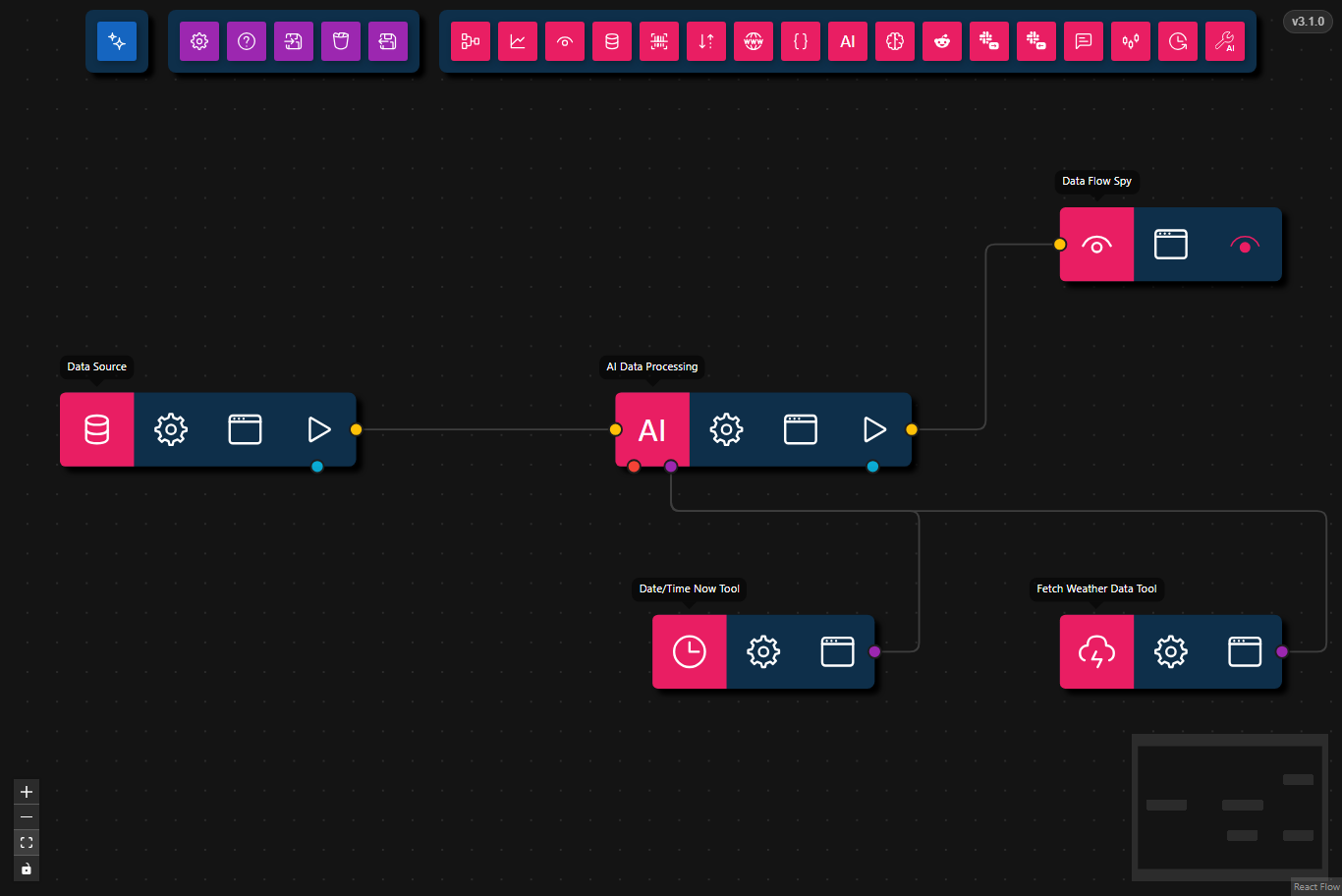
This workflow creates a real-time weather dashboard using the weather API and AI analysis.
- Preview
- JSON
- Node Configuration
{
    "nodes": [
        {
            "id": "bba67841-6e5e-44c8-94ff-08681b21229b",
            "type": "data-source",
            "data": {
                "title": "Data Source",
                "dataSource": {
                    "value": {
                        "text": "What is the weather like now in New York?",
                        "files": []
                    },
                    "type": "markdown-and-files"
                }
            },
            "position": {
                "x": 153.5,
                "y": 465
            },
            "measured": {
                "width": 160,
                "height": 40
            },
            "selected": false
        },
        {
            "id": "e91a9a75-b71d-4456-84ac-5107419c1bf9",
            "type": "ai-tool",
            "data": {
                "title": "Fetch Weather Data Tool",
                "toolSubtype": "fetch-weather-data",
                "userConfig": {
                    "requireToolUse": true
                },
                "userConfigSchema": {
                    "apiKey": {
                        "type": "string",
                        "description": "WeatherAPI.com API Key",
                        "required": true
                    },
                    "requireToolUse": {
                        "type": "boolean",
                        "description": "Require tool use (forces the LLM to always call this tool)",
                        "default": true
                    }
                }
            },
            "position": {
                "x": 693.5,
                "y": 585
            },
            "measured": {
                "width": 120,
                "height": 40
            },
            "selected": false,
            "dragging": false
        },
        {
            "id": "a3cd74e3-f0f7-45de-8618-e59ddb1acc42",
            "type": "ai-tool",
            "data": {
                "title": "Date/Time Now Tool",
                "toolSubtype": "date-time-now",
                "userConfig": {
                    "requireToolUse": true
                },
                "userConfigSchema": {
                    "requireToolUse": {
                        "type": "boolean",
                        "description": "Require tool use (forces the LLM to always call this tool)",
                        "default": true
                    }
                }
            },
            "position": {
                "x": 473.5,
                "y": 585
            },
            "measured": {
                "width": 120,
                "height": 40
            },
            "selected": false,
            "dragging": false
        },
        {
            "id": "0582e5a0-0cdd-489e-aad2-7a9bcde929bd",
            "type": "llm-process",
            "data": {
                "title": "AI Data Processing",
                "prompt": "",
                "model": "gemma4:e4b",
                "maxFeedbackLoops": 0,
                "maxToolRetries": 3,
                "orchestrationMode": true
            },
            "position": {
                "x": 453.5,
                "y": 465
            },
            "measured": {
                "width": 160,
                "height": 40
            },
            "selected": false,
            "dragging": false
        },
        {
            "id": "afea6e54-c370-4579-a13d-bc74de1e372a",
            "type": "data-flow-spy",
            "data": {
                "title": "Data Flow Spy"
            },
            "position": {
                "x": 693.5,
                "y": 365
            },
            "measured": {
                "width": 120,
                "height": 40
            },
            "selected": false,
            "dragging": false
        }
    ],
    "edges": [
        {
            "source": "bba67841-6e5e-44c8-94ff-08681b21229b",
            "target": "0582e5a0-0cdd-489e-aad2-7a9bcde929bd",
            "id": "xy-edge__bba67841-6e5e-44c8-94ff-08681b21229bflow-0582e5a0-0cdd-489e-aad2-7a9bcde929bdflow",
            "targetHandle": "flow",
            "sourceHandle": "flow",
            "animated": false
        },
        {
            "source": "a3cd74e3-f0f7-45de-8618-e59ddb1acc42",
            "target": "0582e5a0-0cdd-489e-aad2-7a9bcde929bd",
            "type": "smoothstep",
            "animated": false,
            "sourceHandle": "tool",
            "targetHandle": "tool",
            "id": "xy-edge__a3cd74e3-f0f7-45de-8618-e59ddb1acc42tool-0582e5a0-0cdd-489e-aad2-7a9bcde929bdtool"
        },
        {
            "source": "0582e5a0-0cdd-489e-aad2-7a9bcde929bd",
            "target": "afea6e54-c370-4579-a13d-bc74de1e372a",
            "type": "smoothstep",
            "animated": false,
            "sourceHandle": "flow",
            "targetHandle": "flow",
            "id": "xy-edge__0582e5a0-0cdd-489e-aad2-7a9bcde929bdflow-afea6e54-c370-4579-a13d-bc74de1e372aflow"
        },
        {
            "type": "smoothstep",
            "animated": false,
            "source": "e91a9a75-b71d-4456-84ac-5107419c1bf9",
            "sourceHandle": "tool",
            "target": "0582e5a0-0cdd-489e-aad2-7a9bcde929bd",
            "targetHandle": "tool",
            "id": "xy-edge__e91a9a75-b71d-4456-84ac-5107419c1bf9tool-0582e5a0-0cdd-489e-aad2-7a9bcde929bdtool"
        }
    ]
}
- Data Source
- Input:
"What is the weather like now in New York?"
- Input:
- AI Data Processing
- Prompt: Uses both date and time context and weather-fetch tools to retrieve current weather information and format the result
- Tools:
- Model: gemma4:e4b
- Data Flow Spy
- Output: Displays the weather information with conditions, temperature, humidity, and wind speed
Steps
- Provide Input: The workflow starts with a Data Source node that supplies the prompt: "What is the weather like now in New York?"
- Augment with Time: A single AI Data Processing node uses the Date/Time Now Tool to add current date and time context to the request.
- Fetch Weather Data: The same AI Data Processing node also calls the Fetch Weather Data Tool to retrieve current weather details, then formats the combined output.
- Display Result: The Data Flow Spy node displays the final weather information including temperature, conditions, humidity, and wind speed.