Customer Total Spend Analysis Workflow
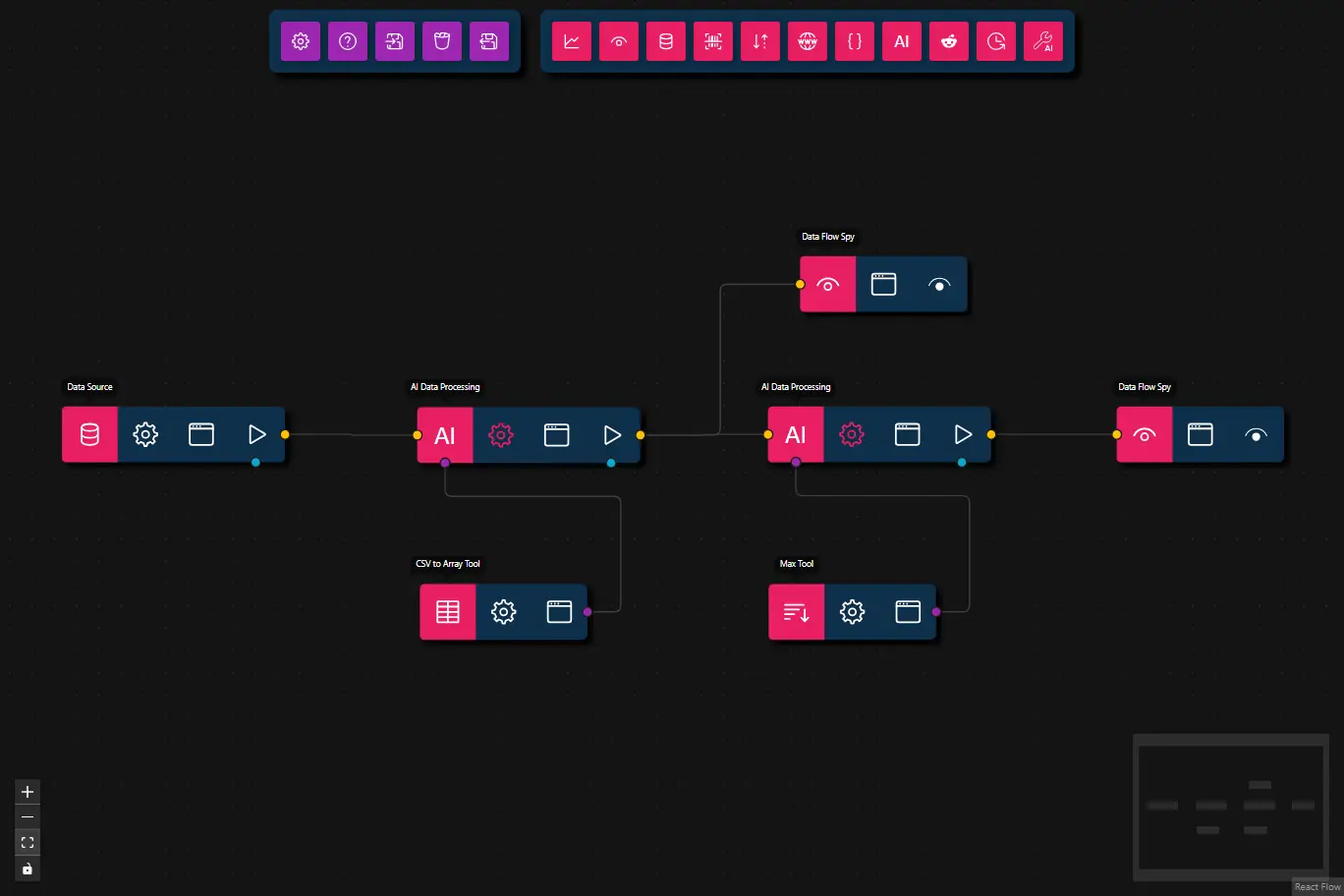
This workflow analyzes customer order data to determine which customer spent the most money in total.
Note:
This workflow uses two AI Data Processing nodes, each with a tool, because the output of the first tool (CSV to Array) is required as input for the second tool (Max Tool).
Current smaller models (≤ 27B parameters) are not able to call the available tools sequentially—they attempt to call both tools at the same time, which leads to incorrect results.
If you use a larger LLM (more than 27B parameters), you can combine both tools in a single AI Data Processing node, as larger models can more reliably call tools one after the other.
- Preview
- JSON
- Node Configuration
{
    "nodes": [
        {
            "id": "723e5744-13a0-43ca-bdbf-8eae5cd5aaea",
            "type": "data-source",
            "position": {
                "x": 93.25,
                "y": 72.75
            },
            "data": {
                "title": "Data Source",
                "dataSource": {
                    "value": {
                        "text": "We need to find the customer that spent the most on products.",
                        "files": [
                            {
                                "name": "data.csv",
                                "content": "```csv\norder_id,customer_name,customer_type,product,category,unit_price,quantity,order_date,shipping_country,payment_method,refunded\r\n1001,Alice Smith,Individual,Laptop Pro 15,Electronics,1800,1,2024-11-02,Germany,Credit Card,false\r\n1002,Bob Johnson,Business,Wireless Mouse,Electronics,25,4,2024-11-02,Germany,Invoice,false\r\n1003,Clara Lopez,Individual,Office Chair,Furniture,220,1,2024-11-03,Spain,PayPal,false\r\n1004,Delta Corp,Business,Standing Desk,Furniture,650,3,2024-11-04,France,Invoice,false\r\n1005,Eva Müller,Individual,Noise Cancelling Headphones,Electronics,320,1,2024-11-05,Germany,Credit Card,true\r\n1006,Foxtrot Ltd,Business,4K Monitor,Electronics,480,5,2024-11-06,Netherlands,Bank Transfer,false\r\n1007,George King,Individual,Mechanical Keyboard,Electronics,150,1,2024-11-06,UK,PayPal,false\r\n1008,Helena Rossi,Individual,Desk Lamp,Home Accessories,45,2,2024-11-07,Italy,Credit Card,false\r\n1009,Indigo LLC,Business,Office Chair,Furniture,220,10,2024-11-08,USA,Invoice,false\r\n1010,Jonas Weber,Individual,Laptop Pro 15,Electronics,1800,1,2024-11-09,Germany,Credit Card,false\r\n\n```"
                            }
                        ]
                    },
                    "type": "markdown-and-files"
                }
            },
            "measured": {
                "width": 160,
                "height": 40
            },
            "selected": false
        },
        {
            "id": "78c30e71-bd24-481c-af7b-e9f09e080e0f",
            "type": "llm-process",
            "position": {
                "x": 348,
                "y": 73.25
            },
            "data": {
                "title": "AI Data Processing",
                "model": "",
                "prompt": "Convert the CSV input to an array of objects using the csvToArray tool.\nRespond ONLY with the resulting array and an echo of the received message (but you MUST remove from the echo any file contents) and NOTHING else.",
                "message": {},
                "format": {
                    "onSuccess": "{\r\n    \"type\": \"object\",\r\n    \"properties\": {\r\n        \"request\": {\r\n            \"type\": \"string\",\r\n            \"description\": \"The original user request but without any file contents.\"\r\n        },\r\n        \"csvArray\": {\r\n            \"type\": \"array\",\r\n            \"description\": \"Array of objects representing the parsed CSV rows.\",\r\n            \"items\": { \"type\": \"object\" }\r\n        }\r\n    },\r\n    \"required\": [\"csvArray\", \"request\"]\r\n}",
                    "onError": "{\r\n  \"type\": \"object\",\r\n  \"properties\": {\r\n    \"error\": { \"type\": \"string\" }\r\n  },\r\n  \"required\": [\"error\"]\r\n}"
                },
                "maxFeedbackLoops": 0,
                "maxToolRetries": 3
            },
            "measured": {
                "width": 160,
                "height": 40
            },
            "selected": false,
            "dragging": false
        },
        {
            "id": "a1b2c3d4-e5f6-7890-abcd-ef1234567890",
            "type": "llm-process",
            "position": {
                "x": 599.5,
                "y": 72.75
            },
            "data": {
                "title": "AI Data Processing",
                "model": "",
                "prompt": "Extract the max from the input array of objects using the max tool.\nYou will need to figure out the key to be passed to the max tool based on the input received.\nRespond ONLY with the resulting array and NOTHING else.",
                "message": {
                    "preffix": ""
                },
                "format": {
                    "onSuccess": ""
                },
                "maxFeedbackLoops": 0,
                "maxToolRetries": 3
            },
            "measured": {
                "width": 160,
                "height": 40
            },
            "selected": false,
            "dragging": false
        },
        {
            "id": "1fa136ea-b63b-4cce-933b-4b4d11820ea3",
            "type": "data-flow-spy",
            "position": {
                "x": 849.5,
                "y": 72.75
            },
            "data": {
                "title": "Data Flow Spy"
            },
            "measured": {
                "width": 120,
                "height": 40
            },
            "selected": false,
            "dragging": false
        },
        {
            "id": "72772a41-da6d-413a-9744-f98e4cd30e2b",
            "type": "ai-tool",
            "position": {
                "x": 600,
                "y": 200
            },
            "data": {
                "title": "Max Tool",
                "toolSubtype": "max",
                "userConfig": {
                    "requireToolUse": true
                },
                "userConfigSchema": {
                    "requireToolUse": {
                        "type": "boolean",
                        "description": "Require tool use (forces the LLM to always call this tool)",
                        "default": true
                    }
                }
            },
            "measured": {
                "width": 120,
                "height": 40
            },
            "selected": true,
            "dragging": false
        },
        {
            "id": "c6bf709b-cbd0-479f-af4b-5946b294d128",
            "type": "ai-tool",
            "position": {
                "x": 350,
                "y": 200
            },
            "data": {
                "title": "CSV to Array Tool",
                "toolSubtype": "csv-to-array",
                "userConfig": {
                    "requireToolUse": true
                },
                "userConfigSchema": {
                    "requireToolUse": {
                        "type": "boolean",
                        "description": "Require tool use (forces the LLM to always call this tool)",
                        "default": true
                    }
                }
            },
            "measured": {
                "width": 120,
                "height": 40
            },
            "selected": false,
            "dragging": false
        },
        {
            "id": "927ef4aa-94ef-4806-b389-8996b589ffaf",
            "type": "data-flow-spy",
            "position": {
                "x": 622.5,
                "y": -35
            },
            "data": {
                "title": "Data Flow Spy"
            },
            "measured": {
                "width": 120,
                "height": 40
            },
            "selected": false,
            "dragging": false
        }
    ],
    "edges": [
        {
            "type": "smoothstep",
            "animated": false,
            "source": "723e5744-13a0-43ca-bdbf-8eae5cd5aaea",
            "sourceHandle": "flow",
            "target": "78c30e71-bd24-481c-af7b-e9f09e080e0f",
            "targetHandle": "flow",
            "id": "xy-edge__723e5744-13a0-43ca-bdbf-8eae5cd5aaearight-source-78c30e71-bd24-481c-af7b-e9f09e080e0fleft-target"
        },
        {
            "type": "smoothstep",
            "animated": false,
            "source": "c6bf709b-cbd0-479f-af4b-5946b294d128",
            "target": "78c30e71-bd24-481c-af7b-e9f09e080e0f",
            "targetHandle": "tool",
            "sourceHandle": "tool",
            "id": "xy-edge__c6bf709b-cbd0-479f-af4b-5946b294d128right-source-78c30e71-bd24-481c-af7b-e9f09e080e0ftools-target",
            "selected": false
        },
        {
            "type": "smoothstep",
            "animated": false,
            "source": "72772a41-da6d-413a-9744-f98e4cd30e2b",
            "sourceHandle": "tool",
            "target": "a1b2c3d4-e5f6-7890-abcd-ef1234567890",
            "targetHandle": "tool",
            "id": "xy-edge__72772a41-da6d-413a-9744-f98e4cd30e2bright-source-a1b2c3d4-e5f6-7890-abcd-ef1234567890tools-target",
            "selected": false
        },
        {
            "type": "smoothstep",
            "animated": false,
            "source": "a1b2c3d4-e5f6-7890-abcd-ef1234567890",
            "sourceHandle": "flow",
            "target": "1fa136ea-b63b-4cce-933b-4b4d11820ea3",
            "targetHandle": "flow",
            "id": "xy-edge__a1b2c3d4-e5f6-7890-abcd-ef1234567890right-source-1fa136ea-b63b-4cce-933b-4b4d11820ea3left-target"
        },
        {
            "type": "smoothstep",
            "animated": false,
            "source": "78c30e71-bd24-481c-af7b-e9f09e080e0f",
            "sourceHandle": "flow",
            "target": "927ef4aa-94ef-4806-b389-8996b589ffaf",
            "targetHandle": "flow",
            "id": "xy-edge__78c30e71-bd24-481c-af7b-e9f09e080e0fright-source-927ef4aa-94ef-4806-b389-8996b589ffafleft-target"
        },
        {
            "type": "smoothstep",
            "animated": false,
            "source": "78c30e71-bd24-481c-af7b-e9f09e080e0f",
            "sourceHandle": "flow",
            "target": "a1b2c3d4-e5f6-7890-abcd-ef1234567890",
            "targetHandle": "flow",
            "id": "xy-edge__78c30e71-bd24-481c-af7b-e9f09e080e0fright-source-a1b2c3d4-e5f6-7890-abcd-ef1234567890left-target"
        }
    ]
}
- Data Source
- Attachment:
data.csv(order data as CSV)Note: to add your own CSV data you will need to attach a file from your local folders
- Attachment:
- AI Data Processing (CSV Parsing)
- Prompt: Converts the CSV file to an array of objects using the csvToArray tool
- Tool: CSV to Array Tool
- AI Data Processing (Max Calculation)
- Prompt: Finds the customer with the highest total spend using the max tool
- Tool: Max Tool
- Data Flow Spy
- Output: Displays the final result
- (Optional) Data Flow Spy
- Output: Used for inspecting intermediate data
Steps
- Provide Input: The workflow starts with a Data Source node that supplies the
data.csvfile (or you can attach your own CSV file) containing order data. - Parse CSV with AI: The first AI Data Processing node uses the csvToArray tool to convert the attached CSV file into an array of order objects.
- Analyze Data with AI: The second AI Data Processing node receives the parsed data and uses the max tool to find the customer with the highest total spend.
- Inspect Output: The Data Flow Spy node displays the final answer.
- (Optional) Inspect Intermediate Data: An additional Data Flow Spy node can be used to inspect intermediate results.