Extract Web Page Data Workflow
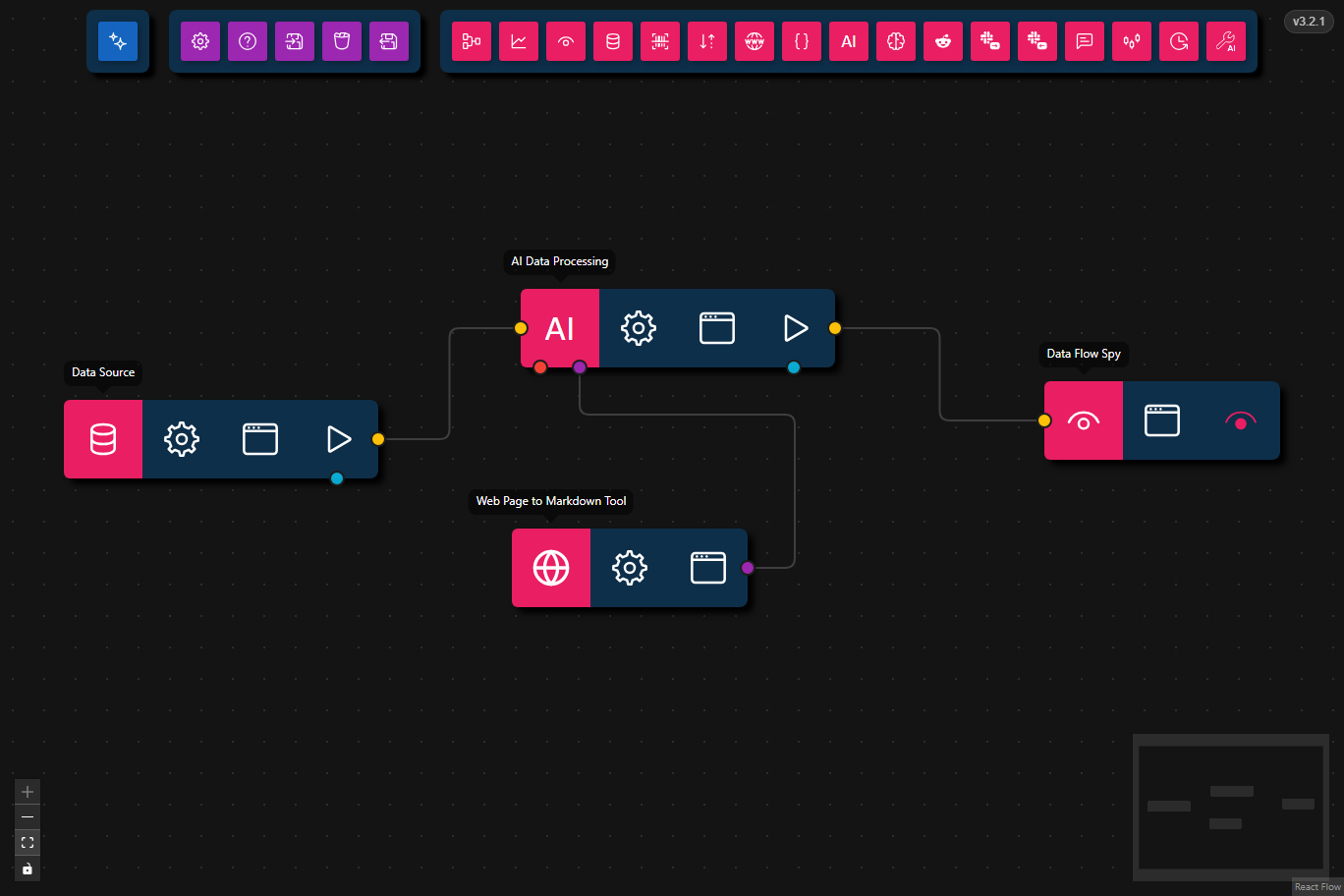
This workflow asks an AI node to read a URL, use the Web Page to Markdown Tool, and return the main points of the page content.
- Preview
- JSON
- Node Configuration
{
    "nodes": [
        {
            "id": "f06a84b1-fa7c-4e8a-b10d-b1ae9fada698",
            "type": "data-source",
            "position": {
                "x": 242,
                "y": 234
            },
            "data": {
                "title": "Data Source",
                "dataSource": {
                    "value": {
                        "text": "What does https://theconversation.com/aliens-might-exist-but-there-are-three-reasons-why-theyre-not-visiting-us-283984 say?",
                        "files": []
                    },
                    "type": "markdown-and-files"
                }
            },
            "measured": {
                "width": 160,
                "height": 40
            },
            "selected": false,
            "dragging": false
        },
        {
            "id": "a7e502e1-feea-4137-a5c6-b052ab5d0b3b",
            "type": "data-flow-spy",
            "position": {
                "x": 741,
                "y": 224.5
            },
            "data": {
                "title": "Data Flow Spy"
            },
            "measured": {
                "width": 120,
                "height": 40
            },
            "selected": false,
            "dragging": false
        },
        {
            "id": "e23e0468-44f8-4739-a856-775c13344296",
            "type": "ai-tool",
            "position": {
                "x": 470,
                "y": 299.5
            },
            "data": {
                "title": "Web Page to Markdown Tool",
                "toolSubtype": "web-page-to-markdown",
                "userConfig": {
                    "requireToolUse": true
                }
            },
            "measured": {
                "width": 120,
                "height": 40
            },
            "selected": false
        },
        {
            "id": "f5322748-a894-4f0f-b7f8-c9f01d689f82",
            "type": "llm-process",
            "position": {
                "x": 474.5,
                "y": 177.5
            },
            "data": {
                "title": "AI Data Processing",
                "model": "gemma4:31b-cloud",
                "prompt": "",
                "format": {},
                "maxFeedbackLoops": 0,
                "maxToolRetries": 3,
                "think": false,
                "temperatureEnabled": false,
                "temperature": 0.8,
                "orchestrationMode": false
            },
            "measured": {
                "width": 160,
                "height": 40
            },
            "selected": false
        }
    ],
    "edges": [
        {
            "type": "smoothstep",
            "animated": false,
            "source": "f06a84b1-fa7c-4e8a-b10d-b1ae9fada698",
            "sourceHandle": "flow",
            "target": "f5322748-a894-4f0f-b7f8-c9f01d689f82",
            "targetHandle": "flow",
            "id": "xy-edge__f06a84b1-fa7c-4e8a-b10d-b1ae9fada698flow-f5322748-a894-4f0f-b7f8-c9f01d689f82flow"
        },
        {
            "type": "smoothstep",
            "animated": false,
            "source": "f5322748-a894-4f0f-b7f8-c9f01d689f82",
            "sourceHandle": "flow",
            "target": "a7e502e1-feea-4137-a5c6-b052ab5d0b3b",
            "targetHandle": "flow",
            "id": "xy-edge__f5322748-a894-4f0f-b7f8-c9f01d689f82flow-a7e502e1-feea-4137-a5c6-b052ab5d0b3bflow"
        },
        {
            "type": "smoothstep",
            "animated": false,
            "source": "e23e0468-44f8-4739-a856-775c13344296",
            "sourceHandle": "tool",
            "target": "f5322748-a894-4f0f-b7f8-c9f01d689f82",
            "targetHandle": "tool",
            "id": "xy-edge__e23e0468-44f8-4739-a856-775c13344296tool-f5322748-a894-4f0f-b7f8-c9f01d689f82tool"
        }
    ]
}
- Data Source
- Input:
"What does https://theconversation.com/aliens-might-exist-but-there-are-three-reasons-why-theyre-not-visiting-us-283984 say?"
- Input:
- AI Data Processing
- Model:
gemma4:31b-cloud - Max Tool Retries:
3 - Purpose: Interprets the request, calls the page-reading tool, and summarizes the result.
- Model:
- Web Page to Markdown Tool
- Reads the target URL in a real browser, follows redirects, dismisses common consent screens, and returns cleaned Markdown.
- Data Flow Spy
- Output: Displays the AI-generated summary of the fetched page content.
Steps
- Provide the URL request: The workflow begins with a Data Source node containing a natural-language request about a specific web page.
- Call the page-reading tool: The AI Data Processing node decides that it needs the Web Page to Markdown Tool and passes the URL to it.
- Fetch and normalize the article: The tool opens the page in Chromium, follows redirects, handles common consent walls, extracts the main content, and converts it to Markdown.
- Summarize the result: The AI node reads the returned Markdown and produces a concise answer describing what the page says.
- Inspect the output: The Data Flow Spy node shows the final response for debugging or reuse.
Common Use Cases
- Summarizing a single article found through a search workflow.
- Reading redirect-heavy links such as Google News
read/URLs. - Turning long-form web content into structured text before feeding it into later workflow steps.
Best Practices
- Prefer direct article URLs when available, even though the tool can handle many redirects.
- Keep
maxToolRetriesenabled so the AI has room to retry when a page initially fails to load. - Use Data Flow Spy while tuning prompts so you can inspect whether the AI is summarizing the page content or merely restating the input.