Stock Analysis & AI Prediction Workflow
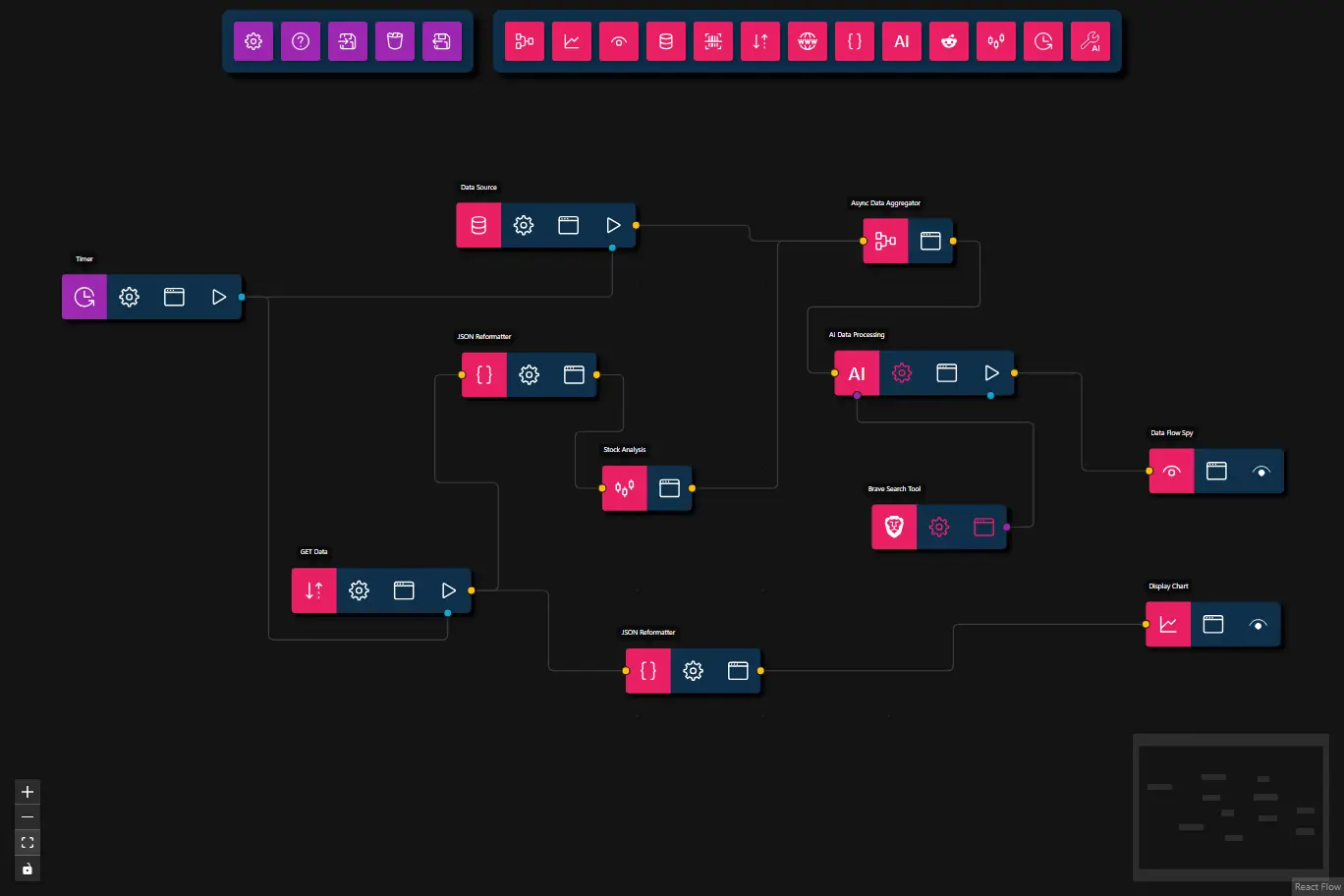
This advanced workflow demonstrates a complete AI-powered stock trading analysis system that combines technical analysis, real-time news sentiment, and machine learning to generate BUY/SELL/HOLD predictions with confidence scores.
Key Features:
- Technical Analysis: Computes moving averages, volatility, trend classification, and volume analysis
- News Integration: Fetches real-time market news using Brave Search
- AI Decision Making: Uses AI to combine technical indicators with news sentiment
- Parallel Processing: Leverages Async Data Aggregator for efficient multi-source data handling
- Dual Output: Displays both AI predictions and interactive price charts
- Preview
- JSON
- Node Configuration
{
    "nodes": [
        {
            "id": "94ccc828-cf75-4323-9273-f7144e539181",
            "type": "get-data",
            "position": {
                "x": 100,
                "y": 100
            },
            "data": {
                "title": "GET Data",
                "url": "https://www.alphavantage.co/query?function=TIME_SERIES_DAILY&symbol=TSLA&outputsize=compact&apikey=demo",
                "dataType": "json",
                "dataProvidedByUpstream": false
            },
            "measured": {
                "width": 160,
                "height": 40
            },
            "selected": false,
            "dragging": false
        },
        {
            "id": "591a8b24-e0ea-4f38-b3ac-b633f2584444",
            "type": "chart",
            "position": {
                "x": 860.5,
                "y": 130
            },
            "data": {
                "title": "Display Chart"
            },
            "measured": {
                "width": 120,
                "height": 40
            },
            "selected": false,
            "dragging": false
        },
        {
            "id": "5ab7119f-bef6-46b3-8de8-a9437b2109e9",
            "type": "json-reformatter",
            "position": {
                "x": 397.5,
                "y": 171.5
            },
            "data": {
                "title": "JSON Reformatter",
                "jsonataExpression": "(\r\n  $series := $lookup($, \"Time Series (Daily)\");\r\n  $ts := $reverse($keys($series));\r\n  $symbol := $lookup($lookup($, \"Meta Data\"), \"2. Symbol\");\r\n  {\r\n    \"labels\": $ts,\r\n    \"datasets\": [\r\n      {\r\n        \"label\": \"Open\",\r\n        \"data\": $map($ts, function($t) { $number($lookup($lookup($series, $t), \"1. open\")) })\r\n      },\r\n      {\r\n        \"label\": \"High\",\r\n        \"data\": $map($ts, function($t) { $number($lookup($lookup($series, $t), \"2. high\")) })\r\n      },\r\n      {\r\n        \"label\": \"Low\",\r\n        \"data\": $map($ts, function($t) { $number($lookup($lookup($series, $t), \"3. low\")) })\r\n      },\r\n      {\r\n        \"label\": \"Close\",\r\n        \"data\": $map($ts, function($t) { $number($lookup($lookup($series, $t), \"4. close\")) })\r\n      }\r\n    ],\r\n    \"title\": $symbol\r\n  }\r\n)"
            },
            "measured": {
                "width": 120,
                "height": 40
            },
            "selected": false,
            "dragging": false
        },
        {
            "id": "bc2336ad-7d59-4e1e-9dd8-c750d2e85c5a",
            "type": "json-reformatter",
            "position": {
                "x": 251.5,
                "y": -92
            },
            "data": {
                "title": "JSON Reformatter",
                "jsonataExpression": "{\r\n    \"symbol\": (\"Meta Data\".\"2. Symbol\"),\r\n    \"data\": (\r\n      $series := $lookup($, \"Time Series (Daily)\");\r\n      $ts := $reverse($keys($series));\r\n      $map($ts, function($t) {{\r\n          \"timestamp\": $t,\r\n          \"open\": $number($lookup($lookup($series, $t), \"1. open\")),\r\n          \"high\": $number($lookup($lookup($series, $t), \"2. high\")),\r\n          \"low\": $number($lookup($lookup($series, $t), \"3. low\")),\r\n          \"close\": $number($lookup($lookup($series, $t), \"4. close\")),\r\n          \"volume\": $number($lookup($lookup($series, $t), \"5. volume\"))\r\n      }})\r\n    )\r\n}"
            },
            "measured": {
                "width": 120,
                "height": 40
            },
            "selected": false,
            "dragging": false
        },
        {
            "id": "9f66ffdb-0783-452e-8591-7b8bce94786e",
            "type": "data-flow-spy",
            "position": {
                "x": 863.5,
                "y": -6.5
            },
            "data": {
                "title": "Data Flow Spy"
            },
            "measured": {
                "width": 120,
                "height": 40
            },
            "selected": false,
            "dragging": false
        },
        {
            "id": "b244cf4f-48a2-445e-a37e-0efec44bc653",
            "type": "stock-analysis",
            "position": {
                "x": 376.5,
                "y": 9
            },
            "data": {
                "title": "Stock Analysis"
            },
            "measured": {
                "width": 80,
                "height": 40
            },
            "selected": false,
            "dragging": false
        },
        {
            "id": "f15d483d-9359-4e23-8ef8-21031a719324",
            "type": "ai-tool",
            "position": {
                "x": 616.5,
                "y": 43.5
            },
            "data": {
                "title": "Brave Search Tool",
                "toolSubtype": "brave-search",
                "userConfig": {
                    "maxResults": 15,
                    "requireToolUse": true,
                    "apiKey": "",
                    "browserPath": ""
                },
                "userConfigSchema": {
                    "apiKey": {
                        "type": "string",
                        "description": "Brave Search API Key",
                        "required": true
                    },
                    "maxResults": {
                        "type": "integer",
                        "description": "Maximum number of results to return",
                        "default": 5,
                        "minimum": 1,
                        "maximum": 20
                    },
                    "requireToolUse": {
                        "type": "boolean",
                        "description": "Require tool use (forces the LLM to always call this tool)",
                        "default": true
                    }
                }
            },
            "measured": {
                "width": 120,
                "height": 40
            },
            "selected": false,
            "dragging": false
        },
        {
            "id": "35785442-2c6d-4ce6-898d-a94ed7c9eb3d",
            "type": "async-data-aggregator",
            "position": {
                "x": 608.876017068864,
                "y": -211.17373968410857
            },
            "data": {
                "title": "Async Data Aggregator"
            },
            "measured": {
                "width": 80,
                "height": 40
            },
            "selected": false,
            "dragging": false
        },
        {
            "id": "eba7ba81-5695-4b58-93b1-12ae981cd504",
            "type": "llm-process",
            "position": {
                "x": 583.376017068864,
                "y": -93.67373968410857
            },
            "data": {
                "title": "AI Data Processing",
                "model": "",
                "prompt": "You are a financial analysis AI.\r\n\r\nYou receive precomputed technical indicators for a stock.\r\n\r\nThe received data contains:\r\n- symbol\r\n- close\r\n- pctChange\r\n- sma5\r\n- sma10\r\n- volumeRatio\r\n- slope\r\n- volatility\r\n- trend (\"up\", \"down\", \"sideways\")\r\n\r\nYou also have access to a \"braveSearch\" tool for retrieving recent news.\r\n\r\nProcess:\r\n1. First evaluate the technical indicators.\r\n2. Then call the \"braveSearch\" tool ONCE using the query:\r\n   \"<symbol> stock news\"\r\n3. Use the search results only to adjust confidence or override\r\n   the decision if there is strong positive or negative news.\r\n\r\nDecision rules:\r\n- Uptrend + positive slope + strong volume → BUY\r\n- Downtrend + negative slope + strong volume → SELL\r\n- Otherwise → HOLD\r\n\r\nNews adjustment:\r\n- Strong positive news → increase confidence or upgrade HOLD → BUY\r\n- Strong negative news → increase confidence or upgrade HOLD → SELL\r\n- Mixed or neutral news → keep technical decision\r\n\r\nConfidence guidelines:\r\n- Strong agreement of technicals + news → 0.75–0.9\r\n- Technicals strong, news neutral → 0.6–0.75\r\n- Mixed signals → 0.4–0.6\r\n- Weak signals → 0.3–0.4\r\n\r\nOutput JSON only:\r\n{\r\n  \"symbol\": symbol,\r\n  \"prediction\": \"BUY | SELL | HOLD\",\r\n  \"confidence\": 0-1,\r\n  \"reason\": \"short explanation referencing indicators and news\"\r\n}",
                "message": {},
                "format": {},
                "maxFeedbackLoops": 0,
                "maxToolRetries": 3
            },
            "measured": {
                "width": 160,
                "height": 40
            },
            "selected": false,
            "dragging": false
        },
        {
            "id": "fa875a47-b5c5-4017-be27-d482011c34ae",
            "type": "data-source",
            "position": {
                "x": 246.5350677761167,
                "y": -225.17989079944738
            },
            "data": {
                "title": "Data Source",
                "dataSource": {
                    "value": {
                        "text": "The stock name is TESLA.",
                        "files": []
                    },
                    "type": "markdown-and-files"
                }
            },
            "measured": {
                "width": 160,
                "height": 40
            },
            "selected": false,
            "dragging": false
        },
        {
            "id": "1ffaea64-fd11-4880-8ed3-63e712fca5f8",
            "type": "timer",
            "position": {
                "x": -104.50851823596591,
                "y": -161.32505773633198
            },
            "data": {
                "title": "Timer",
                "mode": "interval",
                "interval": 0,
                "immediate": false,
                "runOnce": true,
                "repeat": "once"
            },
            "measured": {
                "width": 160,
                "height": 40
            },
            "selected": false,
            "dragging": false
        }
    ],
    "edges": [
        {
            "type": "smoothstep",
            "animated": false,
            "source": "94ccc828-cf75-4323-9273-f7144e539181",
            "sourceHandle": "flow",
            "target": "5ab7119f-bef6-46b3-8de8-a9437b2109e9",
            "targetHandle": "flow",
            "id": "86e4943f-6025-498b-816b-2250e8c36a96"
        },
        {
            "type": "smoothstep",
            "animated": false,
            "source": "5ab7119f-bef6-46b3-8de8-a9437b2109e9",
            "sourceHandle": "flow",
            "target": "591a8b24-e0ea-4f38-b3ac-b633f2584444",
            "targetHandle": "flow",
            "id": "2b844d7c-0729-485f-bfe6-b89bc75618cd"
        },
        {
            "type": "smoothstep",
            "animated": false,
            "source": "94ccc828-cf75-4323-9273-f7144e539181",
            "sourceHandle": "flow",
            "target": "bc2336ad-7d59-4e1e-9dd8-c750d2e85c5a",
            "targetHandle": "flow",
            "id": "xy-edge__94ccc828-cf75-4323-9273-f7144e539181right-source-bc2336ad-7d59-4e1e-9dd8-c750d2e85c5aleft-target"
        },
        {
            "type": "smoothstep",
            "animated": false,
            "source": "bc2336ad-7d59-4e1e-9dd8-c750d2e85c5a",
            "sourceHandle": "flow",
            "target": "b244cf4f-48a2-445e-a37e-0efec44bc653",
            "targetHandle": "flow",
            "id": "xy-edge__bc2336ad-7d59-4e1e-9dd8-c750d2e85c5aright-source-b244cf4f-48a2-445e-a37e-0efec44bc653left-target"
        },
        {
            "type": "smoothstep",
            "animated": false,
            "source": "35785442-2c6d-4ce6-898d-a94ed7c9eb3d",
            "sourceHandle": "flow",
            "target": "eba7ba81-5695-4b58-93b1-12ae981cd504",
            "targetHandle": "flow",
            "id": "xy-edge__35785442-2c6d-4ce6-898d-a94ed7c9eb3dright-source-eba7ba81-5695-4b58-93b1-12ae981cd504left-target"
        },
        {
            "type": "smoothstep",
            "animated": false,
            "source": "eba7ba81-5695-4b58-93b1-12ae981cd504",
            "sourceHandle": "flow",
            "target": "9f66ffdb-0783-452e-8591-7b8bce94786e",
            "targetHandle": "flow",
            "id": "xy-edge__eba7ba81-5695-4b58-93b1-12ae981cd504right-source-9f66ffdb-0783-452e-8591-7b8bce94786eleft-target"
        },
        {
            "type": "smoothstep",
            "animated": false,
            "source": "f15d483d-9359-4e23-8ef8-21031a719324",
            "sourceHandle": "tool",
            "target": "eba7ba81-5695-4b58-93b1-12ae981cd504",
            "targetHandle": "tool",
            "id": "xy-edge__f15d483d-9359-4e23-8ef8-21031a719324right-source-eba7ba81-5695-4b58-93b1-12ae981cd504tools-target"
        },
        {
            "type": "smoothstep",
            "animated": false,
            "source": "b244cf4f-48a2-445e-a37e-0efec44bc653",
            "sourceHandle": "flow",
            "target": "35785442-2c6d-4ce6-898d-a94ed7c9eb3d",
            "targetHandle": "flow",
            "id": "xy-edge__b244cf4f-48a2-445e-a37e-0efec44bc653right-source-35785442-2c6d-4ce6-898d-a94ed7c9eb3dleft-target"
        },
        {
            "type": "smoothstep",
            "animated": false,
            "source": "fa875a47-b5c5-4017-be27-d482011c34ae",
            "sourceHandle": "flow",
            "target": "35785442-2c6d-4ce6-898d-a94ed7c9eb3d",
            "targetHandle": "flow",
            "id": "xy-edge__fa875a47-b5c5-4017-be27-d482011c34aeright-source-35785442-2c6d-4ce6-898d-a94ed7c9eb3dleft-target"
        },
        {
            "type": "smoothstep",
            "animated": false,
            "source": "1ffaea64-fd11-4880-8ed3-63e712fca5f8",
            "sourceHandle": "trigger",
            "target": "fa875a47-b5c5-4017-be27-d482011c34ae",
            "targetHandle": "trigger",
            "id": "xy-edge__1ffaea64-fd11-4880-8ed3-63e712fca5f8timer-trigger-fa875a47-b5c5-4017-be27-d482011c34aetimer-trigger"
        },
        {
            "type": "smoothstep",
            "animated": false,
            "source": "1ffaea64-fd11-4880-8ed3-63e712fca5f8",
            "sourceHandle": "trigger",
            "target": "94ccc828-cf75-4323-9273-f7144e539181",
            "targetHandle": "trigger",
            "id": "xy-edge__1ffaea64-fd11-4880-8ed3-63e712fca5f8timer-trigger-94ccc828-cf75-4323-9273-f7144e539181timer-trigger"
        }
    ]
}
Input & Trigger Nodes
-
- Mode: Run once (can be set to interval for periodic analysis)
- Triggers both data source and API fetch simultaneously
-
- Input: Stock name context (e.g., "The stock name is TESLA.")
- Provides textual context for AI processing
-
- URL: Alpha Vantage API endpoint for daily time series
- Symbol: TSLA (configurable)
- API Key:
demo(⚠️ Important: Replacedemowith your actual Alpha Vantage API key) - Data Type: JSON
Data Processing Nodes
-
JSON Reformatter #1 (Chart Data)
- Purpose: Transforms API response into Chart.js format
- Extracts: Open, High, Low, Close prices
- Output: Multi-dataset chart configuration
-
JSON Reformatter #2 (Analysis Data)
- Purpose: Transforms API response into OHLCV format
- Extracts: Symbol, timestamp, open, high, low, close, volume
- Output: Array of data points for technical analysis
-
- Computes: SMA5, SMA10, volatility, trend, slope, volume ratio
- Input: Minimum 10 data points required
- Output: Technical indicators + trend classification
Aggregation & AI Processing
-
- Combines: Stock analysis results + stock name context
- Waits for both parallel inputs before proceeding
- Output: Array containing both data sources
-
- Model: granite4:latest (or your preferred LLM)
- Prompt: Financial analysis AI with access to technical indicators and news search
- Decision Logic:
- Evaluates technical indicators (trend, slope, volume)
- Calls Brave Search tool for recent news
- Combines both signals for final prediction
- Outputs: BUY/SELL/HOLD with confidence score
- Max Tool Retries: 3
-
- Query:
"<symbol> stock news" - Max Results: 15
- Used by AI to gather news sentiment
- Requires: Brave Search API Key
- Query:
Output Nodes
-
- Displays AI prediction with:
- Symbol
- Prediction (BUY/SELL/HOLD)
- Confidence score (0-1)
- Reasoning (technical + news analysis)
- Displays AI prediction with:
-
- Visualizes: OHLC price data
- Interactive chart with multiple datasets
- Time series view of stock performance
Steps
-
Trigger Workflow The Timer node initiates the workflow, triggering both the Data Source (stock name context) and GET Data (API fetch) nodes in parallel.
-
Fetch Stock Data The GET Data node calls the Alpha Vantage API to retrieve daily historical OHLCV data for the specified stock symbol (e.g., TSLA).
-
Parallel Data Transformation The API response is processed through two parallel paths:
- Path A (Chart): JSON Reformatter extracts and formats Open/High/Low/Close data for visualization
- Path B (Analysis): JSON Reformatter converts data to OHLCV format with proper types
-
Compute Technical Indicators The Stock Analysis node receives the OHLCV data and computes:
- Simple Moving Averages (SMA5, SMA10)
- Price volatility (standard deviation)
- Trend classification (up/down/sideways)
- Volume ratio (current vs. average)
- Price slope (momentum indicator)
- Percentage change
-
Aggregate Multi-Source Data The Async Data Aggregator waits for both inputs:
- Technical analysis results (from Stock Analysis node)
- Stock name context (from Data Source node)
Once both arrive, it combines them into an array and passes to the AI processing node.
-
AI-Powered Decision Making The AI Data Processing node:
- Analyzes Technical Indicators: Evaluates trend, slope, volume ratio, volatility
- Searches for News: Calls the Brave Search tool with query
"<symbol> stock news" - Synthesizes Information: Combines technical signals with news sentiment
- Generates Prediction: Outputs BUY/SELL/HOLD with confidence score
- Provides Reasoning: Explains the decision based on indicators and news
-
Display Results Two parallel outputs show the complete picture:
- Data Flow Spy: Displays AI prediction with symbol, recommendation, confidence, and reasoning
- Display Chart: Shows interactive OHLC chart for visual analysis
Customization Options
- Change Stock Symbol Modify the GET Data node URL to analyze different stocks:
https://www.alphavantage.co/query?function=TIME_SERIES_DAILY&symbol=AAPL&outputsize=compact&apikey=YOUR_KEY
- Fine-tune AI Prompt Customize the AI Data Processing prompt to:
- Add more sophisticated decision rules
- Include risk management considerations
- Adjust confidence scoring methodology
- Add additional data sources
- Add More Context Include additional data sources in the Async Data Aggregator:
- Fundamental data (P/E ratio, earnings)
- Sector performance
- Market indices correlation
- Social media sentiment
Requirements
API Keys
- Alpha Vantage API Key: Get free key at alphavantage.co
- Free tier: 25 requests/day
- ⚠️ Replace the
demoAPI key in the GET Data node with your actual key
- Brave Search API Key: Get key at brave.com/search/api
- Required for news search functionality
LLM Model
- Recommended: Models with 8B+ parameters for reliable tool calling
- Examples:
granite4:latest,llama3.1:8b,qwen2.5:14b - Smaller models may struggle with sequential tool calls