PRO Feature
This workflow is using nodes from the PRO subscription tier. Learn more about PRO
Slack AI Web Search Bot Workflow
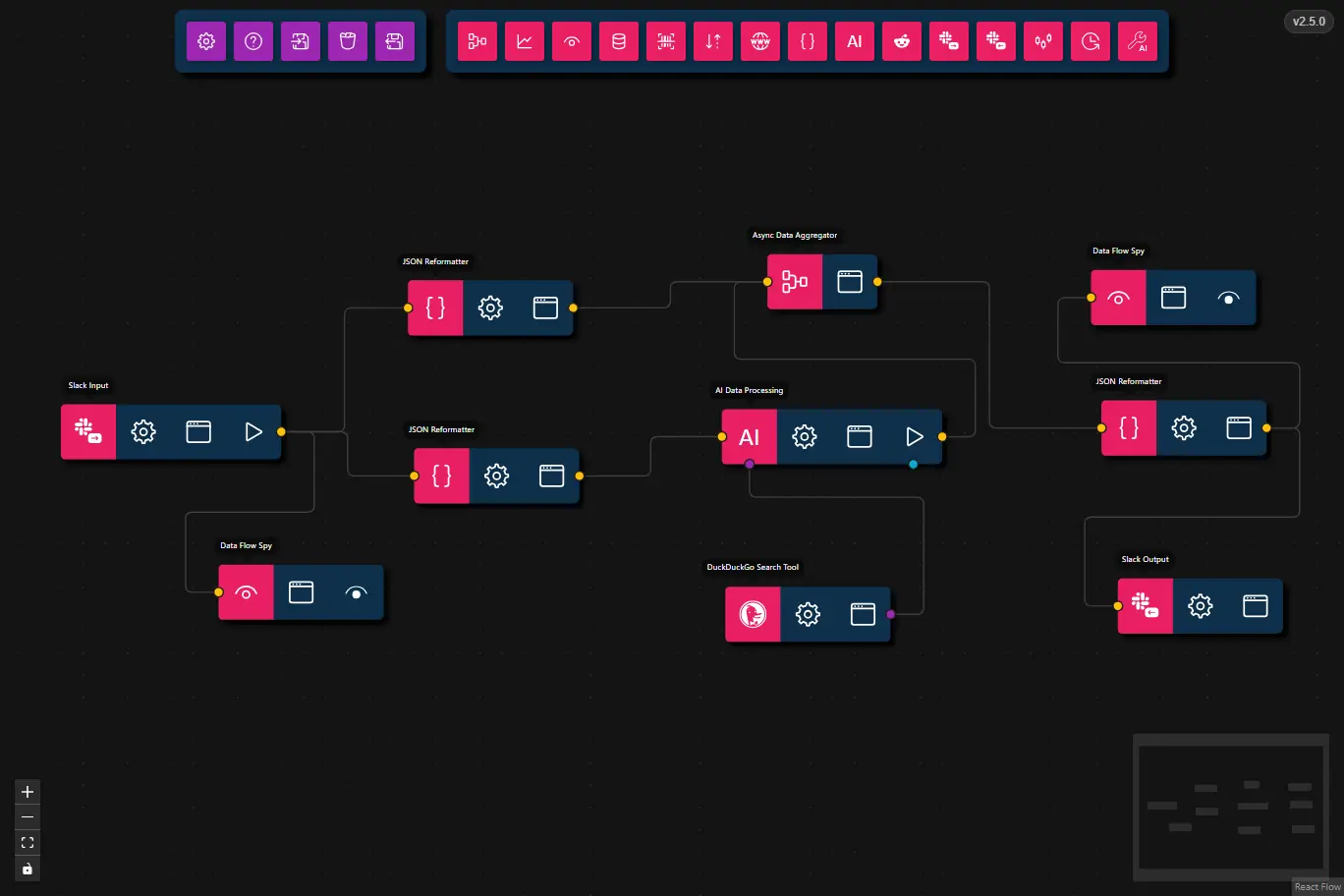
This workflow listens for Slack slash commands, queries the web with DuckDuckGo, and returns the AI-generated response directly in Slack.
- Preview
- JSON
- Node Configuration
This workflow uses the Slack Input Node to receive commands, an AI Data Processing node with the DuckDuckGo Search tool to gather web results, and the Slack Output Node to reply to the user.
{
    "nodes": [
        {
            "id": "3360ba53-ee55-437e-923b-4b9a6067ade6",
            "type": "slack-input",
            "position": {
                "x": 295.5,
                "y": 51
            },
            "data": {
                "title": "Slack Input",
                "commandFilter": "/agentic-signal",
                "routingId": "web"
            },
            "measured": {
                "width": 160,
                "height": 40
            },
            "selected": false
        },
        {
            "id": "cae625cb-e8ed-407c-8552-0bbc7203367e",
            "type": "json-reformatter",
            "position": {
                "x": 552,
                "y": 83
            },
            "data": {
                "title": "JSON Reformatter",
                "jsonataExpression": "message"
            },
            "measured": {
                "width": 120,
                "height": 40
            },
            "selected": false,
            "dragging": false
        },
        {
            "id": "173be744-6758-4590-980c-d90e0b28da46",
            "type": "json-reformatter",
            "position": {
                "x": 547.5,
                "y": -39
            },
            "data": {
                "title": "JSON Reformatter",
                "jsonataExpression": "{\n    \"channelId\": channelId,\n    \"userId\": userId,\n    \"responseUrl\": responseUrl\n}"
            },
            "measured": {
                "width": 120,
                "height": 40
            },
            "selected": false,
            "dragging": false
        },
        {
            "id": "68d69a06-12c0-4d97-8b39-8f26e2536688",
            "type": "llm-process",
            "position": {
                "x": 775.5,
                "y": 54.5
            },
            "data": {
                "title": "AI Data Processing",
                "model": "",
                "prompt": "You MUST use all available tools to provide an answer.\nTools available: \"duckDuckGoSearch\"",
                "message": {},
                "format": {},
                "maxFeedbackLoops": 0,
                "maxToolRetries": 3
            },
            "measured": {
                "width": 160,
                "height": 40
            },
            "selected": false
        },
        {
            "id": "a088d300-e9a1-4b03-b98c-a01be20aebe8",
            "type": "async-data-aggregator",
            "position": {
                "x": 808.5,
                "y": -58
            },
            "data": {
                "title": "Async Data Aggregator"
            },
            "measured": {
                "width": 80,
                "height": 40
            },
            "selected": false,
            "dragging": false
        },
        {
            "id": "4b1d6abd-80d1-4cf3-9687-ba874eca9dba",
            "type": "json-reformatter",
            "position": {
                "x": 1051.0660807290367,
                "y": 48.20579979871614
            },
            "data": {
                "title": "JSON Reformatter",
                "jsonataExpression": "(\r\n  $obj := $[$type($)=\"object\"];\r\n  $msg := $[$type($)=\"string\"][0];\r\n  $merge([$obj, {\"message\": $msg}])\r\n)"
            },
            "measured": {
                "width": 120,
                "height": 40
            },
            "selected": false,
            "dragging": false
        },
        {
            "id": "eeb99d89-81f8-4a4d-b2f7-e1ed1e3a6f8a",
            "type": "data-flow-spy",
            "position": {
                "x": 1043.522319673531,
                "y": -46.51230223067765
            },
            "data": {
                "title": "Data Flow Spy"
            },
            "measured": {
                "width": 120,
                "height": 40
            },
            "selected": false,
            "dragging": false
        },
        {
            "id": "1e889652-dc86-4429-b8c9-c0d88740e461",
            "type": "slack-output",
            "position": {
                "x": 1063,
                "y": 177.5
            },
            "data": {
                "title": "Slack Output"
            },
            "measured": {
                "width": 120,
                "height": 40
            },
            "selected": false
        },
        {
            "id": "c1268f03-a6cf-4013-9282-e1739fc0f00d",
            "type": "data-flow-spy",
            "position": {
                "x": 410,
                "y": 167.5
            },
            "data": {
                "title": "Data Flow Spy"
            },
            "measured": {
                "width": 120,
                "height": 40
            },
            "selected": false,
            "dragging": false
        },
        {
            "id": "5487ec93-620d-4093-9125-08e73030712b",
            "type": "ai-tool",
            "position": {
                "x": 778,
                "y": 183.5
            },
            "data": {
                "title": "DuckDuckGo Search Tool",
                "toolSubtype": "duckduckgo-search",
                "userConfig": {
                    "maxResults": 5,
                    "requireToolUse": true,
                    "browserPath": ""
                },
                "userConfigSchema": {
                    "maxResults": {
                        "type": "integer",
                        "description": "Maximum number of results to return",
                        "default": 5,
                        "minimum": 1,
                        "maximum": 20
                    },
                    "requireToolUse": {
                        "type": "boolean",
                        "description": "Require tool use (forces the LLM to always call this tool)",
                        "default": true
                    }
                }
            },
            "measured": {
                "width": 120,
                "height": 40
            },
            "selected": false
        }
    ],
    "edges": [
        {
            "type": "smoothstep",
            "animated": false,
            "source": "3360ba53-ee55-437e-923b-4b9a6067ade6",
            "sourceHandle": "flow",
            "target": "cae625cb-e8ed-407c-8552-0bbc7203367e",
            "targetHandle": "flow",
            "id": "xy-edge__3360ba53-ee55-437e-923b-4b9a6067ade6right-source-cae625cb-e8ed-407c-8552-0bbc7203367eleft-target"
        },
        {
            "type": "smoothstep",
            "animated": false,
            "source": "3360ba53-ee55-437e-923b-4b9a6067ade6",
            "sourceHandle": "flow",
            "target": "173be744-6758-4590-980c-d90e0b28da46",
            "targetHandle": "flow",
            "id": "xy-edge__3360ba53-ee55-437e-923b-4b9a6067ade6right-source-173be744-6758-4590-980c-d90e0b28da46left-target"
        },
        {
            "type": "smoothstep",
            "animated": false,
            "source": "68d69a06-12c0-4d97-8b39-8f26e2536688",
            "sourceHandle": "flow",
            "target": "a088d300-e9a1-4b03-b98c-a01be20aebe8",
            "targetHandle": "flow",
            "id": "xy-edge__68d69a06-12c0-4d97-8b39-8f26e2536688right-source-a088d300-e9a1-4b03-b98c-a01be20aebe8left-target"
        },
        {
            "type": "smoothstep",
            "animated": false,
            "source": "a088d300-e9a1-4b03-b98c-a01be20aebe8",
            "sourceHandle": "flow",
            "target": "4b1d6abd-80d1-4cf3-9687-ba874eca9dba",
            "targetHandle": "flow",
            "id": "xy-edge__a088d300-e9a1-4b03-b98c-a01be20aebe8right-source-4b1d6abd-80d1-4cf3-9687-ba874eca9dbaleft-target"
        },
        {
            "type": "smoothstep",
            "animated": false,
            "source": "4b1d6abd-80d1-4cf3-9687-ba874eca9dba",
            "sourceHandle": "flow",
            "target": "eeb99d89-81f8-4a4d-b2f7-e1ed1e3a6f8a",
            "targetHandle": "flow",
            "id": "xy-edge__4b1d6abd-80d1-4cf3-9687-ba874eca9dbaright-source-eeb99d89-81f8-4a4d-b2f7-e1ed1e3a6f8aleft-target"
        },
        {
            "type": "smoothstep",
            "animated": false,
            "source": "cae625cb-e8ed-407c-8552-0bbc7203367e",
            "sourceHandle": "flow",
            "target": "68d69a06-12c0-4d97-8b39-8f26e2536688",
            "targetHandle": "flow",
            "id": "xy-edge__cae625cb-e8ed-407c-8552-0bbc7203367eright-source-68d69a06-12c0-4d97-8b39-8f26e2536688left-target"
        },
        {
            "type": "smoothstep",
            "animated": false,
            "source": "173be744-6758-4590-980c-d90e0b28da46",
            "sourceHandle": "flow",
            "target": "a088d300-e9a1-4b03-b98c-a01be20aebe8",
            "targetHandle": "flow",
            "id": "xy-edge__173be744-6758-4590-980c-d90e0b28da46right-source-a088d300-e9a1-4b03-b98c-a01be20aebe8left-target"
        },
        {
            "type": "smoothstep",
            "animated": false,
            "source": "4b1d6abd-80d1-4cf3-9687-ba874eca9dba",
            "sourceHandle": "flow",
            "target": "1e889652-dc86-4429-b8c9-c0d88740e461",
            "targetHandle": "flow",
            "id": "xy-edge__4b1d6abd-80d1-4cf3-9687-ba874eca9dbaright-source-1e889652-dc86-4429-b8c9-c0d88740e461left-target"
        },
        {
            "type": "smoothstep",
            "animated": false,
            "source": "3360ba53-ee55-437e-923b-4b9a6067ade6",
            "sourceHandle": "flow",
            "target": "c1268f03-a6cf-4013-9282-e1739fc0f00d",
            "targetHandle": "flow",
            "id": "xy-edge__3360ba53-ee55-437e-923b-4b9a6067ade6right-source-c1268f03-a6cf-4013-9282-e1739fc0f00dleft-target"
        },
        {
            "type": "smoothstep",
            "animated": false,
            "source": "5487ec93-620d-4093-9125-08e73030712b",
            "sourceHandle": "tool",
            "target": "68d69a06-12c0-4d97-8b39-8f26e2536688",
            "targetHandle": "tool",
            "id": "xy-edge__5487ec93-620d-4093-9125-08e73030712bright-source-68d69a06-12c0-4d97-8b39-8f26e2536688tools-target"
        }
    ]
}
- Slack Input
- Command Filter:
/agentic-signal - Routing ID:
web
- Command Filter:
- JSON Reformatter
- Expression:
message - Purpose: Extracts the text payload from the Slack command for AI processing.
- Expression:
- AI Data Processing
- Model:
llama3.2:1b - Prompt:
You MUST use all available tools to provide an answer. Tools available: "duckDuckGoSearch" - Max Tool Retries:
3
- Model:
- DuckDuckGo Search Tool
- Query: The AI tool uses the user message to search the web for relevant facts and context.
- Async Data Aggregator
- Combines Slack metadata with the AI response before sending to Slack.
- Slack Output
- Sends the final response back to Slack using
responseUrlorchannelId.
- Sends the final response back to Slack using
- Data Flow Spy
- Optional debugging node to inspect intermediate workflow data.
Steps
- Receive Slack command
- The Slack Input Node listens for
/agentic-signal [web] ...and captures the command payload.
- The Slack Input Node listens for
- Extract the message
- A JSON Reformatter node pulls the text payload from the Slack input so the AI node can use it.
- Search the web
- The AI Data Processing node uses the DuckDuckGo Search tool to look up information relevant to the user's request.
- Aggregate metadata
- The Async Data Aggregator merges the AI response with Slack metadata such as
channelId,userId, andresponseUrl.
- The Async Data Aggregator merges the AI response with Slack metadata such as
- Send the response
- The Slack Output Node sends the generated answer back to the user in Slack.
Common Use Cases
- Instant research assistant: Ask Slack for quick summaries and web-backed answers.
- Team support bot: Provide helpful responses to common questions using live search data.
- Command-based knowledge retrieval: Use Slack commands to trigger on-demand web searches.
- Multi-workflow bot: Load multiple Slack Input workflows in parallel, each with a different Routing ID, to handle independent commands from a single bot — e.g.,
/agentic-signal [web] ...for web search,/agentic-signal [weather] ...for weather lookups, etc.
Best Practices
- Use a dedicated Routing ID: Keep
webisolated from other Slack workflows to avoid cross-triggering. - Validate incoming commands: Ensure the Slack Input node only accepts the intended command filter.
- Prefer
responseUrlfor replies: When possible, use the Slack Output Node withresponseUrlto ensure responses land in the correct context. - Monitor with Data Flow Spy: Add spy nodes when debugging command handling or AI output formatting.
Troubleshooting
- No response in Slack: Verify the Slack Output node is configured and connected. Also confirm the Slack app bot token is valid.
- AI returns irrelevant search results: Adjust the prompt or require the AI to use the DuckDuckGo tool more explicitly.
- Slack command not received: Check that the Slack app is installed and Socket Mode is enabled for the Slack Input node.
- Missing web results: Confirm the DuckDuckGo Search tool has the correct settings and that the AI prompt instructs tool usage.